


Effective software testing strategies reduce different categories of delivery risk. No single test type proves that a mobile app, web platform or software product is ready to release. Unit tests check isolated logic, API tests verify service behaviour, integration tests examine system boundaries, end-to-end tests validate complete journeys, and security and performance tests address operational threats. Regression, exploratory, user acceptance and continuous testing add further confidence from different perspectives.
That layered approach matters in the UK. Testing has a strong standards-based history, from BS 7925-2, first published in 1998, to its withdrawal in 2014 after being superseded by ISO/IEC/IEEE 29119, as documented in this background on BS 7925-2. The discipline is also commercially significant. KPMG recorded 4,881 permanent UK jobs citing software testing in the six months to 8 January 2023, compared with 3,182 in 2022, with a median annual salary of £55,000, up from £53,112. Those figures appear in its UK software testing market report.
The practical progression below moves from fast code-level feedback to realistic user and operational validation. It also addresses the release problem that basic test-pyramid advice misses: deciding what level of confidence a change requires before it reaches customers.
1. Unit Testing
Unit testing reduces defects in individual functions, classes or components before those defects spread into integrations and user journeys. Developers run these tests against isolated code, using controlled inputs and replacing databases, payment providers or other external dependencies with test doubles.
A payment calculation function, for example, should handle zero amounts, negative values and currency conversion according to explicit business rules. Form validation tests should check email formats, password strength and field length requirements. Authentication tests should verify token generation, expiry and invalid-token handling without requiring a full mobile or web login journey.

Prioritise behaviour, not an impressive coverage number
High coverage isn't the same as useful coverage. Protect critical business logic first, particularly calculations, permissions, state changes and rules that affect payments or customer data. Exhaustive testing is impossible except in trivial cases, so ISTQB recommends using risk analysis, test techniques and priorities to focus effort, as explained in its Foundation Level testing principles.
Use descriptive names that explain the scenario and expected outcome. Keep tests fast enough to run during normal development, because slow feedback encourages developers to postpone execution. Jest suits JavaScript and TypeScript projects, XCTest supports Apple platforms, and JUnit fits Kotlin and Java systems. The framework matters less than isolation, readability and reliable execution.
Practical rule: Unit tests should make refactoring safer. If a test depends on several services, a network connection and shared database state, it probably belongs at a higher testing level.
2. API Testing
API testing reduces the risk that clients and backend services disagree about requests, responses, authentication or errors. That makes it especially valuable for products with mobile frontends, web interfaces and multiple backend services sharing the same application programming interfaces.
A mobile app's authentication endpoint should accept valid tokens, reject invalid ones and return the documented response format. A payment API should distinguish successful transactions, declined cards and network failures. REST and GraphQL checks should validate payloads, error handling and status codes, including 200 for success, 400 for bad requests and 401 for authentication failures.
Test the service boundary directly
API tests usually provide faster, more stable feedback than UI-only tests because they avoid browser rendering and device interaction. Use Postman, REST Assured or SoapUI according to the API architecture, and define an OpenAPI or Swagger specification that describes the expected contract.
Don't test only the happy path. Include missing fields, malformed values, expired credentials, duplicate submissions and unavailable dependencies. Contract testing is particularly useful when one team owns an API and another owns its mobile or web client. It detects breaking changes before a client reaches production.
Performance checks also belong at this layer when response time affects the user journey. A slow authentication or checkout endpoint undermines every frontend screen built on top of it.
Teams choosing tools for this layer can browse API testing utilities alongside their existing pipeline and specification tools.
3. Integration Testing
Integration testing addresses failures that isolated unit tests can't see. It verifies that components, modules, services, databases and external systems exchange data correctly in an application context.
A mobile app might send a request to a test backend, receive a response and render the correct account state. A payment integration should exercise transaction flows without processing real payments. A database integration test should validate queries, transactions and rollback behaviour through the workflow that uses them, not only through a repository method in isolation.

Control dependencies and environment state
Use stubs or mocks for third-party services you don't control when real calls would make tests slow, expensive or unreliable. Keep explicit contract checks for those boundaries, because a mock only proves that your code works with the mock's behaviour. It doesn't prove that a provider still accepts the request.
Run integration tests in an environment separated from production data. Seed known records, clean up after execution and make test data reproducible. This matters for apps that connect CRM, ERP, identity, payment and notification systems, where one test can otherwise affect another.
The enterprise application integration guide is relevant when teams need to map these service boundaries before deciding which interactions deserve live integration coverage.
Integration tests take longer than unit tests, so run them regularly in continuous integration but keep their stage distinct. A failing test should identify whether the fault sits in application code, configuration, data, network behaviour or a dependent service.
4. End-to-End Testing
End-to-end testing validates a complete user journey through the interface, application layers, services and data stores. It answers the question that lower-level tests cannot answer alone: can a real user complete the intended task in a production-like system?
An eCommerce journey might begin with product browsing, continue through basket and delivery details, and finish with payment confirmation. A registration journey could include account creation, email verification, login and profile setup. A booking app should connect destination selection, availability, payment and confirmation into one realistic flow.
Keep the top layer deliberately narrow
End-to-end tests offer strong user-facing confidence, but they're expensive to run and maintain. A browser test can fail because of timing, environment state, device configuration or a minor presentation change even when the underlying service works correctly. Don't duplicate every API scenario in the interface.
Prioritise revenue-generating and operationally critical journeys. Use Selenium or Cypress for web applications, and Appium where cross-platform mobile interaction needs coverage. Explicit waits for dynamic content are more reliable than fixed delays. Run these tests in a dedicated pre-production environment with controlled accounts, payment sandboxes and predictable data.
The trade-off is clear. A small, stable suite that proves login, checkout, booking or another core journey is more valuable than a large collection of brittle scripts that nobody trusts. End-to-end tests should confirm the most important paths, while unit, API and integration tests provide breadth underneath them.
5. Regression Testing
Regression testing protects existing behaviour after code changes, bug fixes, configuration updates or database work. It re-executes tests that previously passed, with extra attention to areas connected to the change.
After fixing a login defect, run checks for sign-up, password reset and session management. After changing payment processing, retest orders, refunds and declined transactions. After database optimisation, verify affected queries for both accuracy and performance. These examples show why regression scope should follow change impact rather than release habit.
Build a suite people trust
Automate stable regression checks in the CI/CD pipeline and prioritise business-critical features first. Test selection can reduce execution time by running affected checks after a local change, while a broader suite runs at an appropriate pipeline or release stage.
A regression suite needs maintenance. Remove tests for retired features, update assertions when requirements change and add a repeatable test whenever an escaped defect reveals a missing check. Track slow tests and flaky behaviour aggressively. A test that fails intermittently without a product defect trains the team to ignore the entire result.
“A green build is useful only when the team believes the checks are relevant, repeatable and connected to release risk.”
Regression testing isn't a substitute for exploratory testing. Replayed checks confirm known expectations. They don't reliably discover a new usability problem, an unexpected state transition or a workflow that requirements never described.

6. Security Testing
Security testing reduces the risk that attackers exploit weaknesses in authentication, authorisation, data handling, dependencies or application interfaces. It applies to every product, but the consequences are especially serious for apps that handle identity, payments or personal information.
Check that invalid credentials fail safely and that authentication controls resist repeated guessing. Verify that sensitive information receives appropriate protection in transit and at rest. Scan third-party dependencies for known vulnerabilities, and test access controls so one user can't retrieve another user's records by changing an identifier.
Combine automated and human analysis
Static application security testing examines source code and fits naturally into development workflows. Dependency scanning checks packages. Dynamic testing probes a running application in a staging environment, while penetration testing uses human expertise to investigate attack paths that automated tools miss.
No single technique catches every issue. Add security checks to pull requests and delivery pipelines instead of treating security as a final inspection. Review secure coding practices, permissions, secrets management and error responses during development.
For regulated or cloud-heavy UK sectors, security is a material release risk rather than an optional quality activity. Financial services accounted for 31% of testing spend, according to the KPMG market insights report on software testing in financial services. That context supports a risk-based approach, where sensitive workflows receive deeper validation and stronger release controls.
Update threat models, scanners and manual test scenarios as the application changes. A security test that only reflects last year's architecture doesn't protect today's product.
7. Performance Testing
Performance testing measures how an application behaves under expected, increasing and abnormal demand. It identifies bottlenecks, resource constraints and failure behaviour before customers experience slow screens, rejected requests or unavailable services.
Load testing models realistic usage. Stress testing pushes beyond expected capacity to expose failure points. Spike testing introduces sudden demand and examines whether the system recovers or degrades safely. A mobile application's backend, for example, needs tests that reflect concurrent account access, search, booking or checkout activity rather than an artificial stream of identical requests.
Define acceptable behaviour before generating load
Set performance requirements and acceptance criteria before running the test. Without a clear target, a report full of response times and CPU readings doesn't tell the release team whether the product is ready.
Use Apache JMeter, LoadRunner or a cloud load-testing service that fits the architecture. Model user behaviour with pauses, varied journeys and realistic data. Test production-like data volumes because indexes, queries and storage behaviour change as records accumulate. Monitor CPU, memory, input and output, database activity and network use throughout the run.
Performance testing shouldn't run at the same frequency as every unit check. Run it at meaningful milestones, after architecture changes and before high-risk launches. A React Native product, for example, needs both device-side observation and backend validation, so teams working on React Native Android app development should include platform behaviour in the performance scope.
The useful result isn't a maximum load figure. It's a known operating envelope, visible bottlenecks and a defined response when demand exceeds capacity.
8. Exploratory Testing
Exploratory testing finds defects that scripted checks weren't designed to find. Testers learn the product while using it, follow unexpected states and investigate behaviour that looks confusing, inconsistent or unsafe.
A tester might open mobile features in an unusual order and expose a state-management error. On an eCommerce site, they might apply several discount codes, interrupt payment or refresh during confirmation. Poor connectivity, repeated taps and switching between screens often reveal problems that a clean scripted journey avoids.
Give investigation a defined shape
Exploration isn't unplanned testing. Give the tester a feature, risk theme and time-box, then record the paths taken, data used and evidence collected. A session might focus on account recovery, interrupted network requests or accessibility barriers. The tester's notes should let a developer reproduce the defect and should identify whether the issue affects functionality, usability, security or customer confidence.
Experienced testers and domain specialists bring different strengths. A payments specialist notices transaction-state risks, while a customer support representative may find language or workflow problems that engineers overlook.
Use exploratory work alongside structured automation. Convert valuable discoveries into repeatable regression checks when the behaviour is stable and important. Keep investigative scenarios manual when the value comes from observation, judgement and adaptation.
Exploration works best when curiosity has a risk target. Ask what could leave a user stuck, charged incorrectly, locked out or unable to understand the next action.
This strategy is particularly useful for new features, unfamiliar integrations and MVPs, where requirements often leave room for real-world interpretation.
9. User Acceptance Testing
User acceptance testing validates whether the product solves the business problem, not merely whether the implementation matches a technical specification. Actual users or business stakeholders execute realistic workflows in a production-like environment and decide whether the outcome meets operational needs.
Retail managers might verify stock tracking and reporting. SME operators might test bookings and invoice generation. An HR team might validate onboarding, leave tracking and employee records. Each group brings knowledge that automated technical tests don't contain.
Start acceptance work before the build finishes
Define UAT scenarios during requirements and design, then prepare data, accounts and stakeholder time before the release candidate arrives. Provide enough training and documentation for participants to test the workflow rather than spend the session learning the interface.
Run UAT alongside other testing. Waiting until every technical check finishes turns acceptance into a late release gate and leaves little time to resolve misunderstandings. Record defects with business impact, expected outcome and evidence. A stakeholder's objection might identify a genuine failure, a requirement gap or a workflow that needs clarification.
UAT doesn't replace technical validation. Business users shouldn't be expected to discover security vulnerabilities, API contract failures or database race conditions. Their role is to confirm that the combined product supports the work customers and staff need to perform.
For startup teams, the guide to building an MVP is relevant because acceptance criteria should reflect the smallest product that proves a business proposition, not an expanded feature set that nobody has prioritised.
10. Continuous Testing
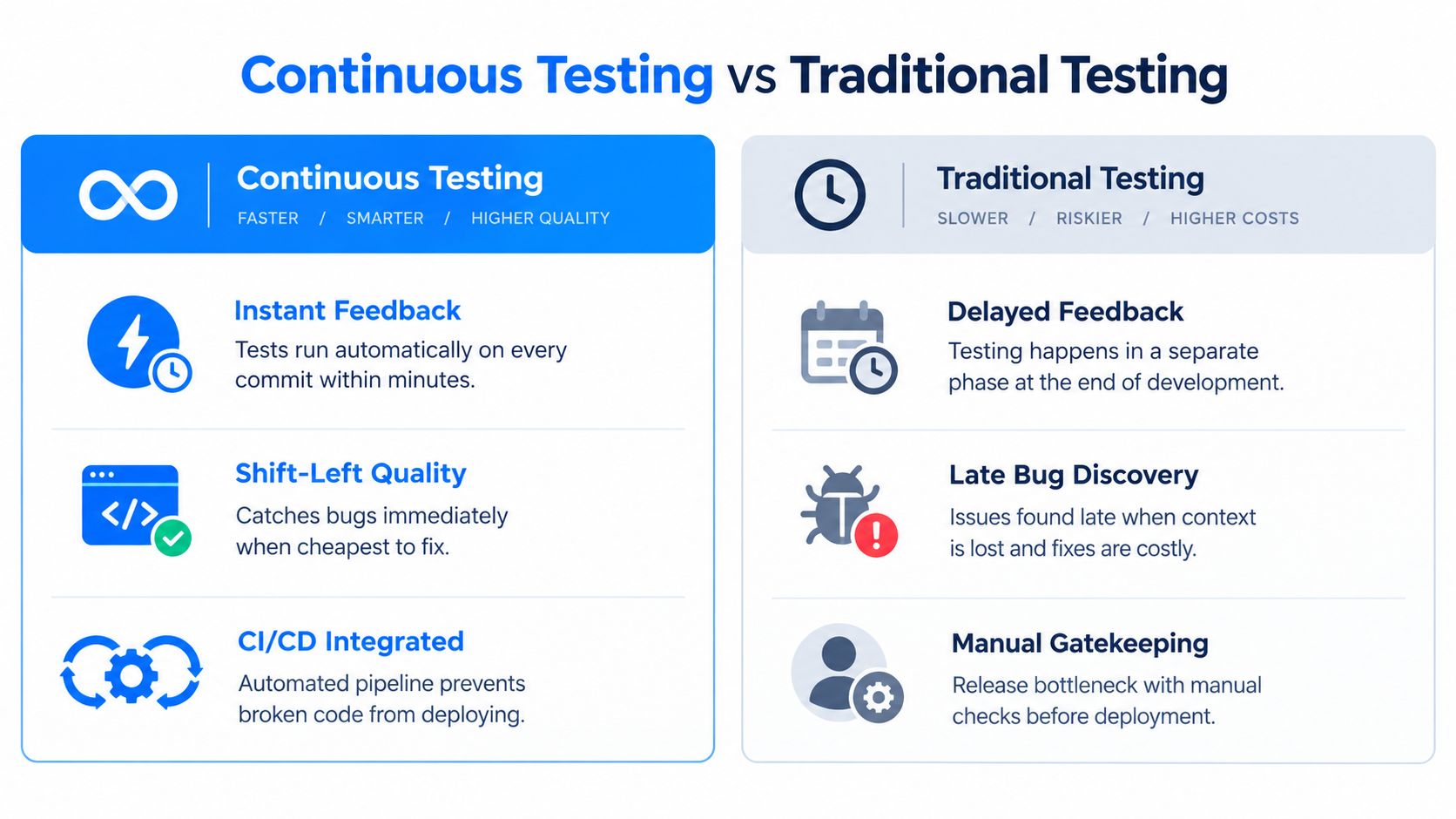
Continuous testing brings quality checks into development and deployment, so feedback follows each code change. A pull request can run unit, API, integration and security checks before merge, while longer end-to-end or performance suites run later in the pipeline. This layered approach connects fast code-level feedback with realistic user and operational validation.
GitHub Actions, GitLab CI and Jenkins support this delivery model. Parallel execution can keep feedback practical, but it cannot repair flaky tests or unclear ownership of failures. Assign each check an owner and a defined response.
Design the pipeline around decision speed
Run quick checks first and stop early when a build contains an obvious defect. Keep results clear enough for developers to act on them. Longer checks can run in later stages, provided each stage has a stated purpose and release decision.
Repair failing tests promptly. Track pass rates, failure causes and flaky checks, then remove or isolate unreliable tests rather than normalising broken builds. Untrusted results create operational risk because teams start ignoring genuine failures.
Continuous testing covers more than functional automation. Add static analysis, dependency checks, accessibility checks and targeted device validation where product risk requires them. Teams building or launching an app can use this guide to building an app to connect delivery milestones with appropriate quality gates. Agencies can review accessibility testing tools for agencies when accessibility needs a dedicated place in the workflow.
ISTQB describes five sequential activities, planning and control, analysis and design, implementation and execution, evaluating exit criteria and reporting, and test closure activities, in its Foundations of Software Testing material. Continuous testing automates suitable parts of this process, while teams retain responsibility for judgement, reporting and closure decisions.
10-Point Software Testing Strategies Comparison
| Technique | 🔄 Complexity | ⚡ Resources / Speed | ⭐ Expected Outcomes | 💡 Ideal Use Cases | 📊 Key Advantages |
|---|---|---|---|---|---|
| Unit Testing | Low per test; requires framework & mocks | Minimal resources; very fast execution ⚡⚡⚡ | High confidence in isolated logic; limited system coverage ⭐⭐⭐ | Core business logic, refactoring, CI gates | Fast feedback; enables safe refactoring; regression protection |
| API Testing | Medium; needs API specs and test harness | Moderate resources; faster than UI tests ⚡⚡ | High for contract correctness and error handling ⭐⭐⭐ | Backend services, mobile APIs, microservices contracts | Catches integration issues early; enables parallel frontend/backend work |
| Integration Testing | Medium–High; environment & dependency setup | Moderate–high resources; slower than unit/API ⚡⚡ | Good for inter-component behaviour and data flow ⭐⭐⭐ | Service interactions, DB integration, third‑party APIs | Reveals interface mismatches; validates real interactions |
| End-to-End Testing | High; complex orchestration and envs 🔄🔄 | Resource‑intensive; slow execution ⚡ | Highest confidence in user workflows; broader brittleness risk ⭐⭐⭐⭐ | Critical user journeys, release validation, UAT readiness | Validates full user experience; stakeholder confidence |
| Regression Testing | Medium–High; large suites to maintain | Can be resource‑heavy as suite grows; slower runs ⚡ | Preserves existing functionality across releases ⭐⭐⭐ | Established apps, frequent releases, post‑fix verification | Prevents regressions; supports safe deployments |
| Security Testing | High; specialised skills and tooling required | Variable; can be time‑consuming and tooling‑heavy ⚡ | Critical for safety/compliance and risk reduction ⭐⭐⭐⭐ | Apps handling sensitive data, payments, compliance scopes | Identifies vulnerabilities; ensures regulatory compliance |
| Performance Testing | High; realistic load scenarios and infra | Very resource‑intensive; needs production‑like load ⚡ | Ensures scalability, capacity and stability under load ⭐⭐⭐ | High‑traffic systems, capacity planning, SRE tasks | Reveals bottlenecks; guides scaling and optimisation |
| Exploratory Testing | Low–Medium; low setup, skill‑dependent | Low tooling; human‑driven and moderate speed ⚡⚡ | Finds unexpected bugs and usability issues; variable coverage ⭐⭐–⭐⭐⭐ | Usability checks, early feature discovery, complex workflows | Discovers edge cases quickly; adaptable and insightful |
| User Acceptance Testing (UAT) | Medium; organisational coordination required | Requires stakeholder time; moderate execution cost ⚡⚡ | Validates business requirements and real‑world fit ⭐⭐⭐ | Business sign‑off, stakeholder validation, production‑like checks | Confirms requirements met; builds stakeholder confidence |
| Continuous Testing | High initial investment; integrates multiple suites 🔄🔄 | Automated; can be very fast if optimised (parallelism) ⚡⚡⚡ | Continuous quality feedback; rapid detection of regressions ⭐⭐⭐⭐ | CI/CD pipelines, rapid release cycles, DevOps environments | Fast feedback loop; prevents broken merges; supports frequent deploys |
Build a Testing Strategy That Fits the Release
A useful strategy starts with risk, not with a tool catalogue. The ISTQB Foundation Level syllabus defines testing strategy through methodology, product and project risk, test levels and high-level activities, and references ISO/IEC/IEEE 29119-1:2022 in its current syllabus. That framing keeps the release question practical: what could fail, who would be affected and what evidence is sufficient to accept the remaining risk?
Protect business logic with unit tests. Verify service boundaries with API and integration tests. Reserve end-to-end automation for critical user journeys that justify its maintenance cost. Add security and performance validation when data exposure, payment processing, availability, scale or compliance creates material operational risk. Use exploratory testing to investigate unknowns, and use UAT to confirm that the product supports real business work.
Automate the checks that are repetitive, stable and valuable at the point where a decision is made. Run fast unit and API feedback early, integration checks as services connect, and broader regression and end-to-end coverage at appropriate pipeline stages. Don't measure success by test volume alone. A smaller reliable suite provides better release evidence than a large collection of duplicated or flaky checks.
Turn confidence into release governance
Define entry and exit criteria for each release. The UK National Occupational Standard for managing software testing activities includes implementing organisational strategies, coordinating staff and resources, and managing testing from definition through execution and reporting, as described in the UK software testing occupational standard. That responsibility belongs across product, engineering, QA and operations, not only to the person who writes test scripts.
UK evidence also shows why this governance matters. One survey reported that 73% of UK organisations had deployed untested code, 44% said it accidentally reached production, and 72% delayed releases because they lacked confidence in test coverage, according to IT Brief's report on untested code. The answer isn't to test everything equally. It's to make risk, evidence and confidence explicit before release.
AI features need the same discipline with additional controls. UK-linked findings report that 77% regard AI testing as essential, while 24% have no dedicated person or team responsible for testing AI applications, and 30% say current processes are inadequate for reliable AI apps, in this survey on software testing efficiency. Probabilistic outputs require human review, prompt and model version control, drift monitoring and acceptance criteria that describe acceptable behaviour rather than one exact response.
For teams that need support across product strategy, engineering, testing, launch and ongoing support, London App Development offers end-to-end mobile, web and software delivery. Its software testing strategy template can also help structure scope, environments, ownership, risks and exit decisions before the first test runs.
If your next release involves a new mobile app, web platform, API integration or AI feature, speak with London App Development about a risk-led testing plan. The team can help define the right test layers, automate reliable feedback and validate the product before launch.