


The app development process has 6 stages: planning, wireframes, design, development, testing, then launch and support. A simple app moves from planning to the app stores in 8 to 12 weeks. A moderate app takes 3 to 6 months. You approve the plan and the designs before any code is written.
London App Development (LAD) builds apps for UK startups and small businesses in these 6 stages. For each stage, you’ll see what happens, what you do and what you get.
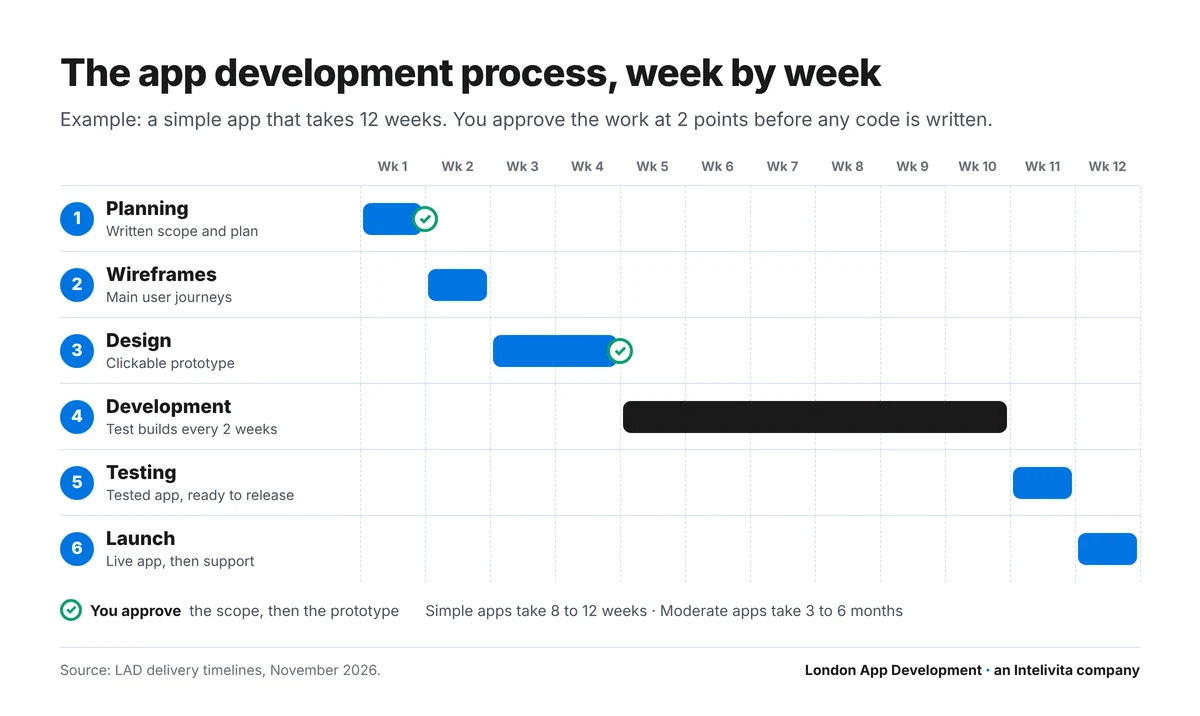
What are the stages of the app development process?
The app development process has 6 stages, and each stage ends with an output you check. The stages of app development run in this order:
- Planning. We agree what the app must do, who it’s for and which platforms it needs. Output: a written scope and project plan.
- Wireframes. We map every screen and the journey between them. Output: wireframes of the main user journeys.
- Design. We design the screens in your brand and link them together. Output: a clickable prototype.
- Development. We build the app for iOS, Android or the web. Output: test builds on your own phone.
- Testing. We test on real iPhones and Android phones and fix what we find. Output: a tested app, ready to release.
- Launch and support. We publish to the App Store and Google Play, then keep the app updated. Output: a live app with ongoing support.
Why do some guides list 7 stages or 5 phases of app development?
The 7 stages and the 5 phases describe the same work, grouped differently. A 7-stage model splits planning in two and separates launch from maintenance. A 5-phase model folds wireframes into design.
| 7-stage model | 5-phase model | Our 6 stages |
|---|---|---|
| 1. Discovery and ideation · 2. Strategy and planning | Planning | 1. Planning |
| 3. UI/UX design | Design | 2. Wireframes · 3. Design |
| 4. Development | Development | 4. Development |
| 5. Testing and quality assurance | Testing | 5. Testing |
| 6. Deployment and launch · 7. Maintenance and updates | Launch | 6. Launch and support |
We keep wireframes as their own stage for one reason. A change costs least there, because no design or code exists yet.
Stage 1: App planning
App planning turns your idea into a written scope: what the app must do, who it’s for and which platforms it needs. Planning ends when you approve the scope, the milestones and a fixed price for the next stage.
- What we do: run a discovery call, sort features into “version 1” and “later”, choose iOS, Android or both, and set milestones.
- What you do: bring the problem, your users, 5 to 10 must-have features and examples of apps you like. Name one person who makes the final decisions.
- What you get: a written scope and an app development plan with dates.
You don’t need a full specification to start. MowMow’s founders arrived with an idea, basic branding and a list of main functions. That was enough to plan their social sports app.
A startup’s first scope is a minimum viable product (MVP): the smallest version that proves demand. Our MVP development team scopes that version first, then plans the rest as later releases.
Security belongs in the scope too. List the personal data the app will hold, so encryption and UK GDPR needs are planned from the start, not patched in later.
Stage 2: Wireframes and user journeys
Wireframes are plain black-and-white layouts of every screen, joined into user journeys such as signing up or making a booking. They show how the app works before anyone designs or codes it.
- What we do: map each user journey screen by screen, then write the detailed use cases behind them.
- What you do: walk through each journey and tell us what’s missing or in the wrong order.
- What you get: wireframes of the main user journeys, agreed before design starts.
A wireframe uses grey boxes in place of final content. Joined by arrows, the screens form a user journey, which designers also call a wireflow.
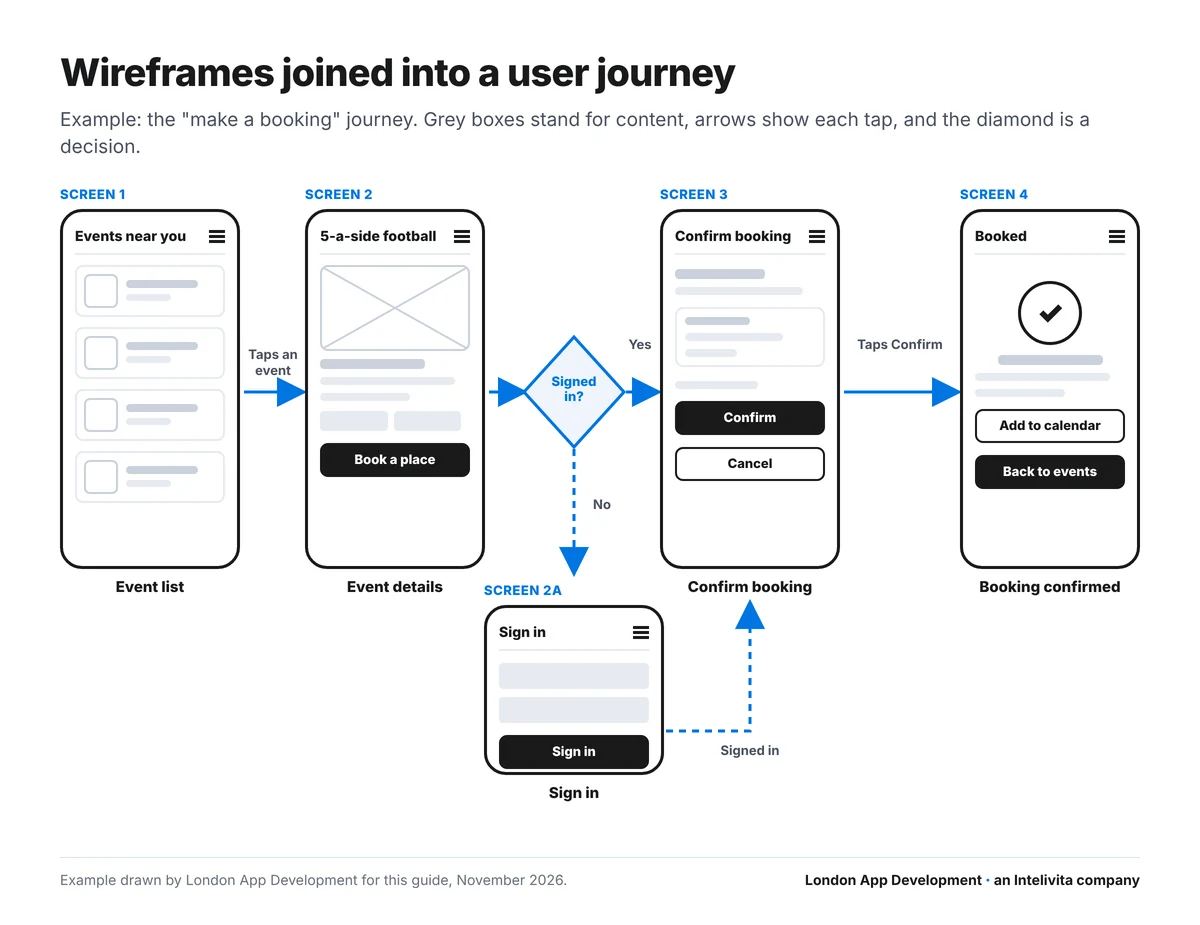
For MowMow, we mapped 3 journeys first: creating a profile, making a booking and connecting with other people. The co-founder described the result in a Clutch review.
“They have the ability to understand what we need and effectively document it through wireframes. They also understand the bigger picture in terms of client goals.”
Stage 3: App design and prototype
App design turns the approved wireframes into finished screens in your brand, then links them into a clickable prototype in Figma. You tap through the prototype on your own phone and approve it before development starts.
- What we do: set colours, type and components, and follow Apple’s and Google’s design rules for each platform.
- What you do: show the prototype to 5 future users and collect what confuses them.
- What you get: a clickable prototype and the Figma files, which you own.
The brief is short at this stage. MowMow’s founders asked for an orange and dark grey colour scheme, and the designers built the palette around it.
Design approval is the second and last gate before code. Every change after it goes through a costed change request.
Most delays come from decisions, not code. Agree the scope, approve the designs, and the build moves quickly.
Stage 4: App development
Developers build the app in 2-week sprints, and each sprint ends with a test build on your own phone. The build covers 3 parts: the front end users tap, the back end that stores data, and the API integrations.
- What we do: write the code, review it, and release a test build every 2 weeks.
- What you do: open each build, try the new features and reply before the next sprint is planned.
- What you get: working test builds, plus a weekly status update.
How does a sprint work in app development?
A sprint is a 2-week cycle with 4 steps: plan, build, release a test build, then collect your feedback. Your feedback sets the plan for the next sprint.
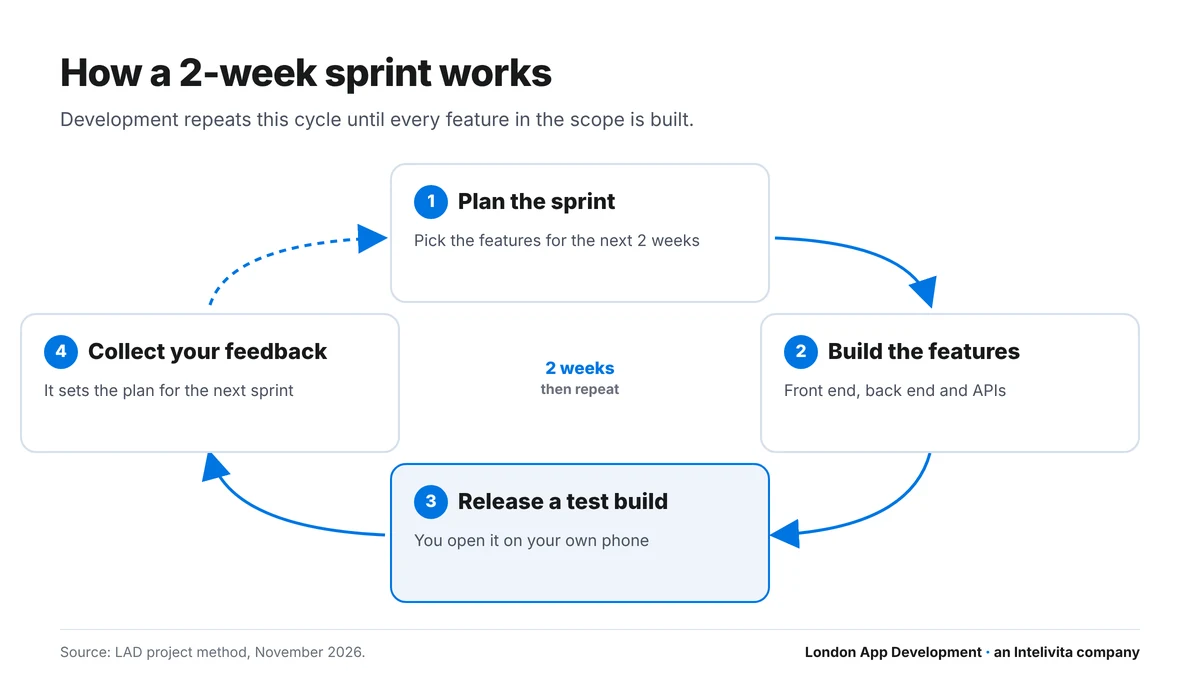
MowMow ran on agile sprints with 2-week releases. The founders tested each build through TestFlight, Apple’s testing app, and followed progress in Basecamp and Trello. Ostique, a later project, had weekly status reports and calls.
What happens when you want a change during the build?
A change during the build is priced first, and work starts only after you approve the price. The fixed price for the agreed scope stays the same.
Unify London Taxis changed its black taxi booking app many times between June 2022 and May 2023. The founder reviewed the project on Clutch.
“Intelivita has done all that we asked on time, and then adapted it all to suit our constant adjustments.”
Stage 5: App testing
App testing checks every feature on real iPhones and Android phones, across screen sizes and operating system versions, before the public sees the app. Bugs found in testing are fixed before release.
Testing covers 4 areas:
- Functional testing: every button, form and user journey works as the scope says.
- Usability testing: real users complete the main tasks without help.
- Performance testing: the app stays fast on older phones and slow connections.
- Security testing: logins, payments and personal data are protected.
Beta testing comes last. On iPhone, testers install the app through TestFlight. On Android, Google sets a rule for new personal developer accounts. Accounts created after 13 November 2023 need 12 testers opted in for 14 days in a row before release (Google Play Console Help).
- What we do: test on real devices, fix the bugs and run the beta test.
- What you do: line up 12 or more testers from your own customers during development.
- What you get: a tested app, ready to release.
We run this stage as part of the build, and as a separate mobile app testing service for apps another team built.
Stage 6: App launch and support
At launch, the app is submitted to the App Store and Google Play, reviewed by each store, then released to the public. Support starts the same day: bug fixes, updates for new iOS and Android versions, and new features.
Store review takes days, not weeks:
- App Store: Apple reviews 50% of apps within 24 hours and 90% within 48 hours (Apple App Review).
- Google Play: review takes up to 7 days, or longer in exceptional cases (Google Play Console Help).
- Company accounts: Apple asks companies for a D-U-N-S Number, which takes up to 7 business days (Apple Developer).
Each side has a job at launch:
- What we do: prepare the store listings, submit the app and answer the reviewers’ questions.
- What you do: open the developer accounts in your company’s name, so you own them.
- What you get: a live app, the source code and monthly support.
Store rules, UK data protection and launch-day checks are covered step by step in how to launch an app.
Launch is not the end of the mobile app development lifecycle. Real usage shows what to build next, and version 2 starts again at planning. After MowMow launched on iOS in December 2019, an Android version and wearables went onto its roadmap.
How long does the app development process take?
The app development process takes 8 to 12 weeks for a simple app and 3 to 6 months for a moderate app, from planning to launch. Development is the longest stage in both.
| Stage | Simple app | Moderate app |
|---|---|---|
| 1. Planning | 1 week | 1 to 2 weeks |
| 2. Wireframes | 1 week | 1 to 2 weeks |
| 3. Design | 1 to 2 weeks | 2 to 4 weeks |
| 4. Development | 4 to 6 weeks | 7 to 14 weeks |
| 5. Testing | 1 week | 1 to 2 weeks |
| 6. Launch | Up to 1 week | 1 to 2 weeks |
| Total | 8 to 12 weeks | 13 to 26 weeks |
A simple app has one type of user, core screens and sign-in. A moderate app has several user types, payments or bookings, and an admin panel.
Your own timeline depends on what you have today. The planner works out your starting stage, your dates and your launch window.
Plan your app timeline
Answer 4 questions to see which stage you start at, your dates for each stage and your launch window.
Question 1 of 4
What are you building?
Complex apps take longer. MowMow covered 140 sports with events, a map and rewards, and took 13 months from November 2018 to launch. Unify London Taxis took 11 months, including the client’s changes.
Three things add weeks to any timeline: late feedback on builds, scope changes after design approval, and store accounts opened late. Platform choice changes the timeline too. One cross-platform codebase is quicker than 2 native apps, as our guide to mobile app development for startups and small businesses explains.
Who does what in an app development project?
An app development project needs a small team on the agency side and one decision-maker on yours. Each role owns one part of the process.
| Role | What they do | Most active in |
|---|---|---|
| Project lead | Agrees scope and milestones, and keeps you updated | Every stage |
| Team lead | Plans the build and reviews each release | Stages 1, 4 and 5 |
| UI/UX designer | Draws wireframes, screens and the clickable prototype | Stages 2 and 3 |
| Mobile app developer | Builds the iOS and Android app | Stage 4 |
| Front-end developer | Builds the web app and admin panel | Stage 4 |
| Back-end developer | Builds the server, database and APIs | Stage 4 |
| You | Approve the scope and designs, test builds, own the accounts | Stages 1, 3, 4 and 6 |
On our projects, co-founder Dhaval Sarvaiya is the project lead from the first call to launch. Our homepage introduces the people in the other roles at our app development agency in London.
Larger projects add roles. MowMow’s team included a relationship manager, a solution architect and a scrum master.
When do you pay for each stage?
You pay stage by stage, and each stage has a fixed price agreed before it starts. With LAD, the first consultation and the written quote are free.
- Planning: free consultation and quote.
- Wireframes and design: one payment for the design stage.
- Development and testing: one fixed price, split across milestones.
- Support: a monthly fee after launch.
Stage-by-stage payment protects your budget. You stop after design with a prototype you own, or carry on to the build. The price bands for each stage are in our guide to how much an app costs in the UK. Founders raising money first will find the routes in our guide to funding for app development.
Does every app need the full app development process?
Every app goes through the same 6 stages, but the size of each stage changes with what you start from. Three starting points change the process most.
An MVP. An MVP keeps all 6 stages and cuts the scope. Version 1 holds only the features that prove demand, so development takes weeks, not months. The choices that keep version 1 small are in our guide on how to build an MVP.
A prototype from an AI app builder. Planning starts with a code review instead of a blank page. The review shows which screens stay and which parts need rebuilding for payments, security and store approval. Builders, AI tools and learning to code are compared in our guide on how to make an app yourself.
A custom app for an existing business. Planning spends more time on the systems the app connects to: bookings, payments, stock or a CRM. Wireframes follow the one job your customers repeat. That scope is the core of a custom app development project.
Which mistakes slow the app development process down?
Five mistakes cause most delays, and all 5 are decisions, not code problems.
| Mistake | What happens | How to avoid it |
|---|---|---|
| No single decision-maker | Feedback conflicts and approvals stall | Name one person in planning |
| Skipping wireframes | Missing screens appear during the build | Approve every user journey first |
| Changing scope mid-sprint | The sprint restarts and the date moves | Send changes as costed requests |
| Opening store accounts late | Launch waits for a D-U-N-S Number | Open accounts during development |
| No beta testers lined up | Google Play’s 14-day test starts late | Recruit 12 testers during development |
Frequently asked questions
What are the 7 stages of app development?
The 7 stages of app development are discovery, planning, UI/UX design, development, testing, launch and maintenance. Some teams group them into 6 stages or 5 phases, but the work is the same.
What are the 5 phases of the app development process?
The 5 phases of the app development process are planning, design, development, testing and launch. This model folds wireframes into design and maintenance into launch.
How long does it take to develop an app?
A simple app takes 8 to 12 weeks from planning to launch. A moderate app with payments, several user types and an admin panel takes 3 to 6 months. Complex apps take longer: 2 real projects in this guide took 11 and 13 months.
Do I need a full specification before starting?
No. A one-page brief is enough: the problem, your users, 5 to 10 must-have features and your budget range. The planning stage turns that brief into a written scope.
Is the app development process agile or fixed?
It is both. The scope and price are fixed before each stage starts. Inside the development stage, the team works in agile sprints of 2 weeks, each ending with a test build.
Can I skip wireframes and go straight to design?
Skipping wireframes saves a week and risks many more. Wireframes show missing screens and broken user journeys while changes are still cheap. Fixing the same problem in code takes far longer.
Can I bring my own app designs?
Yes. A team reviews existing designs against the scope and each platform’s rules, then builds from them. Designs with gaps go back through a short wireframe or design stage first.
Can I change features during development?
Yes. Each change is written up as a change request, priced, and approved by you before work starts. Small changes fit into the next sprint; large changes move the launch date.
What happens after an app is launched?
After launch, an app needs bug fixes, security updates and a new release for each major iOS and Android version. New features are planned from real usage, and they follow the same 6 stages.
Start your app at stage 1
The first stage is free with LAD: a call with Dhaval, then a written scope and a fixed quote. Bring your idea, your users and your must-have features.
Sources and method: stage names and timelines from London App Development’s delivery process · project facts and quotes from verified Clutch reviews of Intelivita, LAD’s parent company (MowMow, January 2020; Unify London Taxis, May 2023) · store review times from Apple App Review and Google Play Console Help · tester rule from Google Play Console Help · D-U-N-S timing from Apple Developer. All checked November 2026.