


You're staring at a familiar trade-off. The product is growing, users complain that every click feels heavier than it should, and the team is asking whether a single page application will make the experience smoother or create a bigger maintenance problem later.
The honest answer is that an SPA is not just a front-end style choice. It changes how navigation, rendering, accessibility, SEO, testing and release management work. In the UK, that matters even more because public-facing services and regulated products have to stay accessible, explain their compliance position, and behave properly when JavaScript, zoom, reflow or assistive technology gets involved. GOV.UK's own guidance treats accessibility and fast delivery as part of the service standard, not an optional extra, and that's a useful lens for any team making this decision. GOV.UK accessibility guidance
A good way to think about it is simple. A traditional website asks the browser to fetch a fresh document each time you move to a new page. A single page application loads one HTML document first, then uses JavaScript to update the view as you move around the product. MDN defines an SPA exactly that way, as a single document that gets updated in the browser with JavaScript APIs such as Fetch when the content changes. MDN SPA glossary
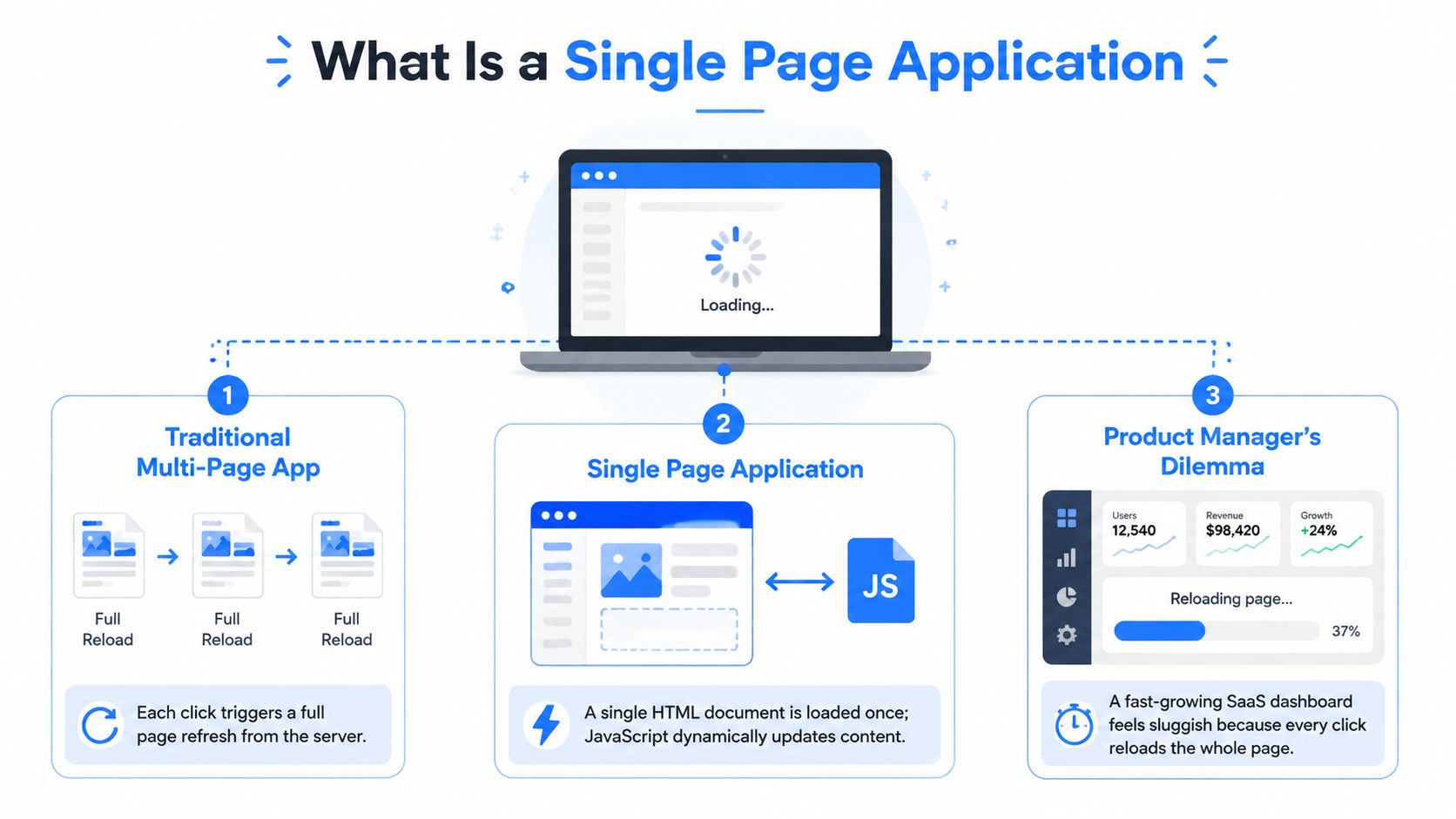
What Is a Single Page Application
A single page application is a web app that loads one HTML document, then changes what the user sees without doing a full page reload each time they click around. In practical terms, the browser gets the shell once, and JavaScript swaps in new content as the user moves from one view to another. That's the core idea, and everything else, routing, state, rendering, performance tuning, flows from it.
That makes an SPA feel more like an app than a classic website. A dashboard, internal portal or booking flow can keep the same browser session alive while the interface changes around the user. It can feel smoother than reloading an entire page every time, but that smoothness only happens if the architecture is built carefully.
Practical rule: if the product only needs a few simple pages, don't assume an SPA is automatically the better fit. Use it when the interaction model genuinely benefits from persistent state and app-like navigation.
A traditional multi-page application works differently. Each navigation sends the browser back to the server for a new document, which the browser then renders as a complete page. That model is often easier for search engines, simpler for accessibility, and less demanding on the front end because the browser handles more of the work natively.
For a product manager, the choice usually isn't “modern versus old”. It's whether the user journey is better served by a browser-native document model or by a client-side interface that behaves like software. A Web App Development Company evaluates this decision against application requirements such as navigation complexity, persistent state, rendering, performance and long-term maintainability.
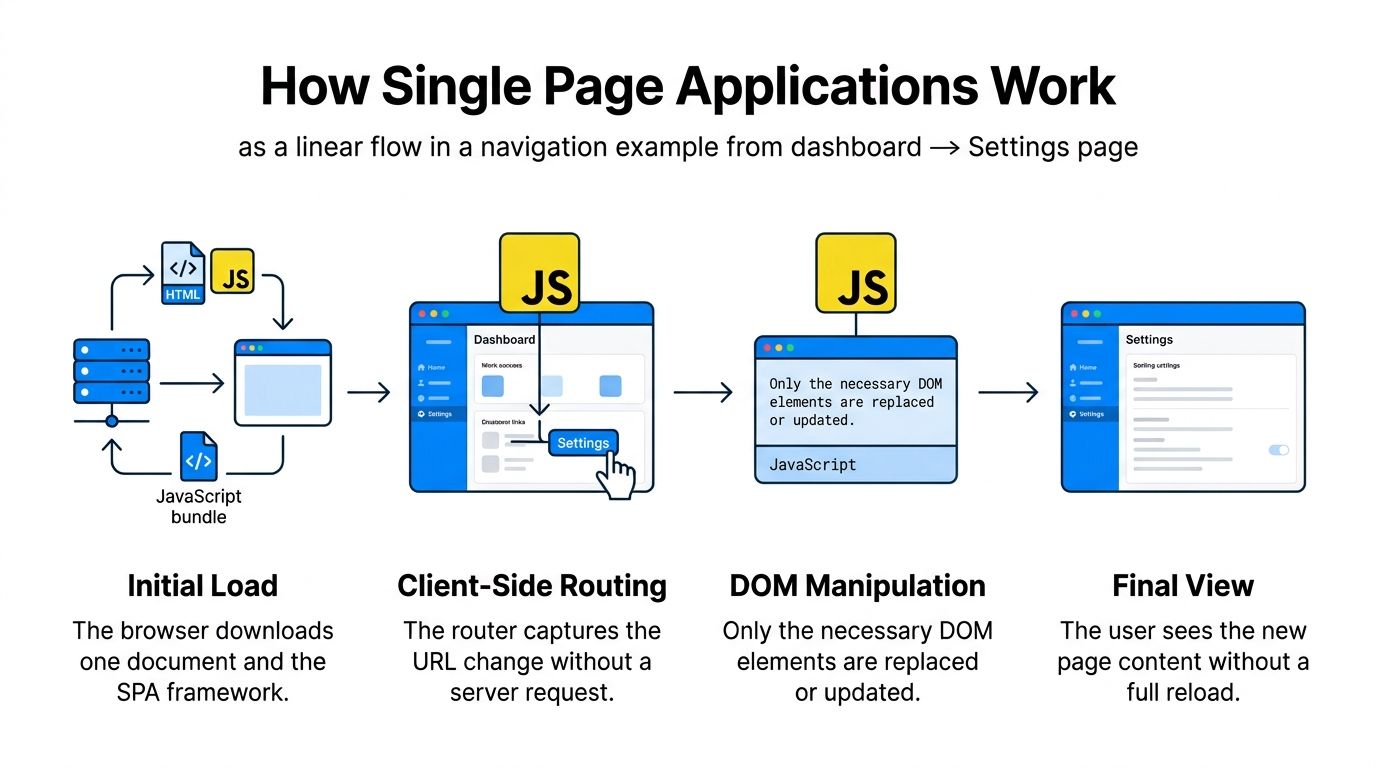
How Do Single Page Applications Work?
An SPA starts with one document load, then takes over navigation in the browser. When a user clicks from a dashboard to settings, the app intercepts the navigation, updates the URL, fetches the needed data, and changes only the relevant parts of the page. The browser doesn't rebuild the whole document unless the app asks it to.
The routing layer does the navigation work
The browser's History API gives SPAs the tools to manage that experience. MDN lists methods such as pushState(), replaceState(), back(), forward() and go(), which let the app change the URL and session history without a full reload. MDN History API
That's why routing matters so much in SPA design. The application has to act like the browser would have acted by default, while also keeping the interface in sync with state, data and URL changes. MDN also notes that the newer Navigation API is intended for SPA-style navigation patterns because it can initiate, intercept and manage navigation actions. MDN Navigation API overview
CSR, SSR and hydration are not the same thing
Client-side rendering, or CSR, means the browser builds the visible interface after the JavaScript runs. Server-side rendering, or SSR, means the server sends HTML that's already shaped for the user. Static site generation, or SSG, prebuilds that HTML ahead of time. Hydration sits in the middle, where the HTML arrives first, then JavaScript attaches behaviour afterwards.
That distinction matters because a page can look ready before it behaves like an app. Users may see content quickly, but if the interface still needs to hydrate, clicking links or submitting forms can feel unresponsive for a moment. That's one reason hybrid frameworks are often used for SPAs that also need search visibility and reliable first paint.
A good SPA does not just “render fast”, it stays understandable to the browser, to screen readers and to search engines at the same time.
For product teams, the important question is not which rendering mode sounds cleverest. It's which one matches the content, the interaction depth and the operational risk of the product you're building.
Single Page Application vs Multi Page Application
The clearest way to compare these models is to ask what the product needs from the browser. A dashboard, CRM or internal tool often benefits from SPA behaviour because users keep working in the same session and move through many views. A marketing site, editorial platform or policy-heavy public service usually leans the other way because separate documents are easier to crawl, easier to expose to assistive tech and often easier to reason about.
GOV.UK's own design guidance is a strong reminder that page structure and loading discipline still matter, even in modern government services. It says services should start with one question per page rather than a long form because that pattern works better for low-confidence users, mobile devices, errors and branching journeys, and it also notes that page load times need to be very fast. GOV.UK design guidance
SPA vs MPA at a glance
| Criterion | Single Page Application | Multi Page Application |
|---|---|---|
| First load | Often heavier because the browser must load JavaScript before the app feels complete | Usually simpler because each page arrives as a complete document |
| Later navigation | Can feel very fast when routing and data fetching are well tuned | Often reloads more of the page on each navigation |
| SEO | Can be harder when content depends on JavaScript, especially without SSR or pre-rendering | Usually easier for crawlers because content arrives as HTML |
| Accessibility | Needs explicit focus management, announcements and keyboard handling | Browser defaults do more of the work |
| Development complexity | Higher, because the team owns routing, state, error handling and client behaviour | Lower for simpler sites, because the browser handles more navigation work |
| Offline and resilience | Can support richer client-side behaviour, but failures are easier to create if JavaScript breaks | More robust by default when JavaScript is missing or interrupted |
The choice between an SPA and an MPA also affects app development cost. SPAs often require more front-end work for routing, state management, testing and performance optimisation, while MPAs rely more on traditional server-side page loading. The right approach depends on the product’s features, complexity and long-term requirements.
Common Pitfalls of SPAs and How to Mitigate Them
SPAs often fail when teams treat them as a front-end shortcut rather than a full application architecture. The problems usually appear in the same places, loading, crawlability, keyboard flow, long-lived sessions and failure handling. These are the moments where a polished demo turns into a clumsy real-world experience.
The main risks show up early and late
A heavy initial bundle can delay the point where the app feels usable, especially when too much JavaScript ships up front. Split routes, load only what each journey needs and prefetch likely next steps instead of sending one large bundle to every user. That is a build-time decision, not a polish task.
SEO problems appear when important content only shows up after JavaScript runs. For content that must be crawled reliably, SSR or pre-rendering is the safer pattern for those routes, with client-side interactivity layered on top. IONOS explains that single page applications require additional SEO considerations because search engines need to discover and process dynamically generated content.
Accessibility risk is the other major issue. GOV.UK guidance for accessible services says content should stay logical and should not depend on CSS or JavaScript to reorder it after load, and it asks teams to test accessibility regularly once a service is in public beta. GOV.UK accessible web guidance
Mitigation belongs in the architecture, not the backlog
A route change that a keyboard user or screen reader cannot perceive is not a real navigation. It is just pixels changing on screen.
A practical mitigation plan usually includes route-level code splitting, server-rendered or pre-rendered HTML for crawlable pages, visible focus management, ARIA live regions for announcements and progressive enhancement for core flows. It also means testing what happens when scripts fail or when a user stays in the same session for a long time, because state-heavy apps can accumulate memory problems that do not show up in a short demo.
Testing is an important part of SPA development because routing, state changes and JavaScript-driven interactions need to work reliably across browsers, devices and user journeys. Dedicated software testing services help identify functional, performance and usability issues before release.
What Should You Check Before Launching an SPA?
Before launch, verify production routing, server fallbacks, crawlable URLs, metadata, analytics, error monitoring, accessibility and real-device performance. Include these checks in your app launch process to catch production issues before users encounter them.
Choosing the Right Framework and Tooling
Framework choice should follow the product, not the other way around. React, Angular, Vue and Svelte all support modern SPA development, but each one suits a different team shape and maintenance model. The same is true for meta-frameworks like Next.js and Remix, which blend client interactivity with server rendering where needed.
React is a good fit when the team wants a broad ecosystem and reusable component structure. Angular suits larger enterprise teams that benefit from opinionated conventions. Vue is often easier for mixed-skill teams to pick up. Svelte and SvelteKit tend to appeal when bundle lean-ness and directness matter. Next.js and Remix are often chosen when the product needs both SPA-style interaction and stronger rendering control for SEO or initial load.
If you want a broader comparison of modern options, this guide to front-end frameworks is a useful companion. Vite also deserves mention because it improves local development speed regardless of whether the team chooses React, Vue or another framework.
A useful way to think about tooling is in layers. Frameworks shape how UI is built, routing libraries shape how navigation works, and meta-frameworks shape where rendering happens. The right combination depends on who will maintain it a year from now, not just who can ship the first version fastest. For product teams that like architectural reference points, Zemith's architecture blueprints for developers can help frame the bigger system design before a framework is chosen.
SPA Framework and Tooling at a Glance
| Framework | Rendering Model | Best For | Watch Out For |
|---|---|---|---|
| React | Client-rendered by default, often paired with SSR tools | Reusable component-heavy products and teams with broad hiring needs | Easy to overbuild the state layer |
| Angular | Opinionated client framework with strong structure | Large enterprise teams and regulated environments | Heavier process if the product is small |
| Vue | Flexible client framework | Mixed-skill teams that want a gentler learning curve | Can become inconsistent without conventions |
| Svelte / SvelteKit | Client-first, with SvelteKit adding server rendering options | Performance-sensitive interfaces and compact bundles | Smaller ecosystem than React |
| Next.js | Hybrid rendering with SPA interactivity | Content-heavy products that still need app-like behaviour | Needs clear discipline around rendering boundaries |
| Remix | Hybrid rendering with strong routing and data handling | Teams that value web fundamentals and structured data flow | Less familiar to some teams than React-only setups |
| Vite | Build tool, not a framework | Faster development and simpler builds | Doesn't solve architecture decisions by itself |
If you're comparing options for a real product rather than a prototype, an app development agency can help map framework choice to team size, compliance needs and maintenance capacity before the build starts.
Best Practices for Performance, SEO, Accessibility and Security
A SPA works only when performance, search visibility, accessibility, and security are planned together. Separate them and the product can feel fast in one browser while failing crawlability, focus handling, or basic security checks elsewhere.
Build the app so it behaves predictably
Start with the user journey. Load the first screen quickly, then fetch the next route only when it is likely to be needed. Keep the code needed for the first interaction close to the entry point, and use server rendering or static generation on pages that need to be indexed. Metadata, canonical tags, and sitemaps should match the routes people and search engines can reach.
Accessibility needs the same discipline. Follow WCAG 2.2 expectations, keep tab order logical, and announce route changes so screen readers know the page has changed. A client-side app can feel like a smooth hallway, but only if each doorway is clearly marked for keyboard and assistive tech users.
UK compliance makes this more than a coding preference. Public-facing services need an accessibility statement that explains the level of compliance, lists known exceptions, and gives users a route to report problems. That turns accessibility into an operating obligation, not a one-time checklist. GOV.UK accessibility statement guidance
Security should be treated with the same care. Set a strict Content Security Policy, sanitise rendered HTML, protect authentication tokens, and review every third-party script before it goes live. SPAs often hold more user state in the browser, so one weak dependency can affect a wider part of the interface.
Testing and deployment close the loop
Testing needs to cover unit, integration, visual regression, and end-to-end flows. SPA bugs often appear where components hand off to one another, so a single test layer is never enough. If you need help checking how rendering choices affect discoverability, software testing support from London App Development can help teams validate the build before release. For a closer look at the SEO side, LLMrefs has a useful guide on rendering strategies for SPAs.
Deployment should be predictable. Edge hosting, atomic rollouts, and real-user monitoring give you a safer release path when a route or bundle changes. That matters most for app-like products with frequent updates and long user sessions.
Migration, Modernisation and When to Get Expert Help
Modernising an existing web app in stages, not by ripping everything out at once, is a sound approach. Start with an audit of build times, bundle size, framework version, accessibility gaps, test coverage and deployment cadence. That gives you a baseline for deciding whether the app needs a targeted refactor, a hybrid rendering layer or a fuller replatform.
Small steps reduce the risk
Common entry points include adding TypeScript, introducing a proper router, swapping CSS-in-JS for utility or scoped CSS, adopting a meta-framework for SSR, or extracting a design system. Each of those reduces future friction without forcing a complete rewrite. For older estates, a strangler-fig approach works well, because parallel routes and feature flags keep the risky parts isolated while the rest of the product stays live.
Legacy SPAs, including AngularJS or jQuery-heavy builds, often need extra care around state, routing and accessibility. GOV.UK's accessibility monitoring for public sector websites and mobile apps specifically flags reflow failures, where interfaces don't adjust well to browser size, zoom or orientation. That matters because dynamic layouts can pass in a desktop demo and still fail users once the page is zoomed or resized. GOV.UK accessibility monitoring report
Candid advice: if the app is already hard to test, hard to crawl and hard to keep accessible, a rewrite is rarely the first move. Start by reducing risk in one journey, then expand.
When does outside support make sense?
Startups usually don't need outside support unless the product is becoming more complex than the founding team can safely own. SMEs tend to benefit most during replatforming, compliance work or accessibility remediation. Enterprises should consider external help for audits, security review and team augmentation, especially when multiple squads are touching the same front end.
A consulting partner can help map those decisions to the broader product plan, which is where services like software development consulting become useful. London App Development can also be one option when a team needs structured support across web architecture, testing and delivery, but the main point is to choose help that reduces risk rather than adds another layer of process.