


Verdict: build for iOS first when people pay to use your app. Build for Android first when it earns from volume or advertising. Build for both when your launch date is fixed.
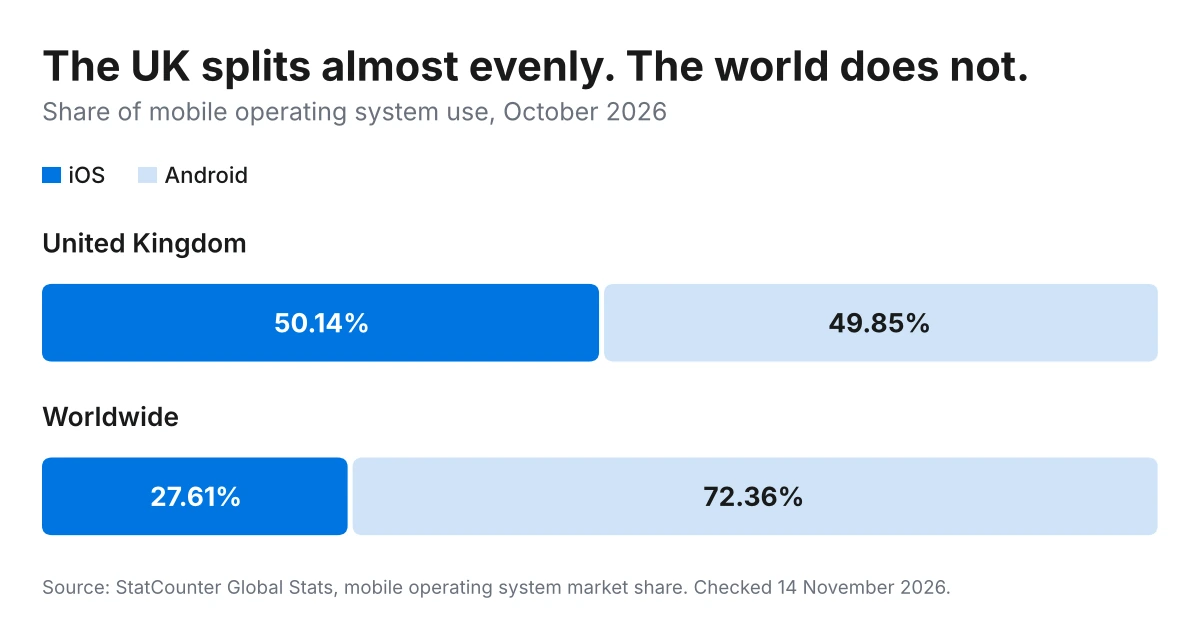
UK phones split almost evenly. In October 2026, iOS held 50.14% of the UK mobile market and Android held 49.85% (StatCounter, checked 14 November 2026). Neither platform gives you more reach here.
That changes the decision. Reach is the reason most Android vs iOS development guides give for picking Android, and in the UK it does not apply. What decides it is how your app earns money, who your users are, and whether you need both platforms on day one.
At London App Development we have built apps that launched on one platform and added the second later. We have also shipped apps on both at once, and built one that stayed on iOS alone. Below is what separates the two platforms, what each store charges, and what the second platform adds.
What is the difference between Android and iOS app development?
Android and iOS app development are the two native routes to a mobile app. They use different programming languages, different tools, different app stores and different review rules. Each one is built and maintained on its own.
Here is how the two compare on the points that change a project.
| iOS | Android | |
|---|---|---|
| Main language | Swift | Kotlin |
| Older language | Objective-C | Java |
| Interface toolkit | SwiftUI, UIKit | Jetpack Compose, XML views |
| Built in | Xcode | Android Studio |
| Computer needed | Mac only | Windows, macOS or Linux |
| App store | App Store | Google Play |
| Device range | Narrow, Apple only | Wide, many manufacturers |
| Testing load | Lower | Higher |
Which mobile platform do UK users have?
UK users are split almost evenly: 50.14% on iOS and 49.85% on Android in October 2026 (StatCounter, checked 14 November 2026). One platform reaches half your UK market.
Worldwide, the picture is different. The same source puts Android at 72.36% and iOS at 27.61% for the same month. That global figure is the one most mobile app development guides quote, and it is where the “Android means reach” argument comes from.
So if your users are in the UK, use the UK figure. Building for Android alone leaves out half of them. Building for iOS alone leaves out the other half.
Two things follow. Reach stops being the tiebreaker, because the platforms are level. And a one-platform launch in the UK is a decision to start with half your market, not a decision to take most of it.
Should you build your app for iOS or Android first?
Build for iOS first when people pay to use your app. Build for Android first when it earns from volume or advertising. Build for both at once when your launch date is fixed and the app is the business rather than a channel for it.
Three questions settle it: how the app earns, where your users are, and whether the launch date moves.
When to build for iOS first
Build for iOS first when your app charges a price, sells subscriptions or takes in-app purchases. iOS app development also suits a first version you want to test quickly, because Apple sells a narrow range of devices and that cuts the testing work.
The trade-off: you start with half the UK market, and you pay for the second platform later.
When to build for Android first
Build for Android first when your app is free and earns from advertising or volume, or when your users sit outside the UK. Android app development costs less to get into: a Google Play account is a one-off US$25, against US$99 every year for Apple.
The trade-off is a closed testing rule that most comparison guides leave out. It applies to personal Google Play Console accounts opened after 13 November 2023. Before the app reaches the public, you must run a closed test with at least 12 testers. Those testers must stay opted in without a break for 14 days (Google Play Console Help, checked 14 November 2026).
So plan those two weeks into an Android-first launch. Or register an organisation account instead, which the rule does not cover.
When to build for both at once
Build for both at once when your launch date is fixed, your users already expect both, or the app is the product you sell. Two native builds mean two codebases, two sets of testing and two sets of maintenance.
One codebase is the way round that. A cross-platform framework such as React Native or Flutter builds both apps from the same code, so you pay for one build and maintain one app.
What languages are Android and iOS apps written in?
iOS apps are written in Swift, with Objective-C in legacy code. Android apps are written in Kotlin, with Java in legacy code. The interface layers differ too: SwiftUI and UIKit on iOS, Jetpack Compose and XML views on Android.
None of it carries across. An Android app rewritten for iOS is a fresh build in Swift, not a conversion of the Kotlin work.
That is the part worth knowing before you sign anything. Ask your app development company which language your app will be written in, and why. An app in Objective-C or Java costs more to extend and takes longer to staff, because fewer developers work in them now. Our team builds new iOS work in Swift and new Android work in Kotlin for that reason.
One more thing to settle early. Agree who owns the source code and where it lives, in writing, before the first line is written. The language matters less than whether you hold the repository at the end of it.
What tools do you need to build each app?
The development environment differs on one point that costs money. iOS apps are built in Xcode, which runs only on a Mac. Android apps are built in Android Studio, which runs on Windows, macOS or Linux. Both tools are free to download.
The Mac requirement is a real cost. An in-house team building for iOS needs Apple hardware for every developer, on top of salaries. For most UK businesses that tips the decision towards an agency rather than a hire.
Test distribution differs as well, and the gap is wide. Apple’s TestFlight takes up to 10,000 external testers by email or a public link (Apple Developer Program, checked 14 November 2026). Google Play’s closed track asks for 12 before a personal account reaches production. So a large public beta is simpler on iOS, and a quick first release is simpler on Android.
Which platform is harder to build for?
Android takes more testing. iOS takes more compliance. Neither is harder to write.
Android runs on handsets from dozens of manufacturers, across many screen sizes and several live OS versions. That device fragmentation lands as testing days and layout work, not as harder code.
iOS runs on a short list of devices, so there is less to test. Apple reviews every submission against the App Store Review Guidelines, and a rejection means a fix and a resubmission. That time goes on meeting the rules instead.
Budget for it in the right place. An Android build needs more days in test. An iOS build needs more slack before launch.
What do Apple and Google charge app developers?
Apple charges US$99 a year for the Apple Developer Program. Google charges a one-off US$25 to register a Play Console account, and it never renews. The app review that follows works differently on each.
| Apple | ||
|---|---|---|
| Developer account | US$99 a year | US$25, one time |
| Renews | Every year | Never |
| Review | Human review against published guidelines | Largely automated |
| Testers before launch | Up to 10,000 on TestFlight | 12 minimum on personal accounts |
| Extra step | Resubmission after a rejection | 14-day closed testing on personal accounts |
Sources: Apple Developer Program and Play Console Help. Checked 14 November 2026.
One thing matters more than the fees. Whoever owns these accounts owns your app’s place in the store. Register both in your own company’s name, and keep the logins. Moving an app off a developer’s account later is slow, and in some cases it means publishing again from scratch.
What does it cost to build for one platform or both?
One platform costs much the same whichever you pick, because it is the same work in a different language. The second platform is what adds money: two native codebases double the build and the ongoing maintenance.
A client we have worked with since 2015 described the staffing plainly on Clutch. One person for iOS, one for Android, and the backend team on top. That is the shape of a dual-native bill.
Get the second platform priced at the start, even when you are not building it yet. A one-platform quote says nothing of what the pair costs. London App Development prices both in the same scope, so the second number is on the table before you commit to the first. Full figures sit in what app development costs in the UK.
What happens when you add the second platform later?
The second platform is cheaper and faster than the first. The design, the backend, the content and every product decision already exist, so what is left is the platform work.
That is the part the choice turns on, and it is why a one-platform start is less risky than it reads. You are not halving your app. You are sequencing it.
What carries over: the backend and its database, the designs, the content, the integrations, and every decision on how the app behaves. What does not carry over: the app code itself, the platform testing, and the store listing. So the second build is the smaller half of the job, as long as the backend was written to serve both from the start.
Here is how it has gone on three London App Development projects.
Three routes, three different right answers. The pattern across them is that the platform follows the users and the revenue, never the global market share.
We are the UK arm of Intelivita, and the track record is shared. Our team holds 4.8 out of 5 from 52 verified reviews on Clutch, on projects from US$2,000 to US$500,000. Clients name quality, scheduling and communication as the strengths. Checked 14 November 2026.
What do you decide after choosing a platform?
Three decisions follow the platform choice: native or cross-platform, the language on iOS, and the language on Android. Each one changes what the build costs to extend later.
Native or cross-platform comes first, because it sets whether you pay for one codebase or two. React Native vs native development shows where each approach wins.
On iOS, the language question is Swift against legacy Objective-C. It matters most when you inherit an existing app, because older code takes longer to staff. The guide to iOS programming languages covers what each one means for hiring.
On Android, the same question runs between Kotlin and Java. Google has backed Kotlin as its preferred language since 2019, so new builds start there. The guide to the Android programming language choice sets out the difference.
Frequently asked questions
Should you build your app for iOS or Android first?
Build for iOS first when users pay a price, a subscription or in-app purchases. Build for Android first when the app is free and earns from advertising or volume, or when the audience sits outside the UK. In the UK both platforms hold half the market, so the revenue model decides it rather than reach.
Which mobile platform do most UK users have?
UK mobile users split almost evenly. iOS held 50.14% and Android held 49.85% in October 2026, according to StatCounter. Worldwide the same month ran 72.36% Android to 27.61% iOS, so the global figure misstates the UK.
Is Android harder to develop for than iOS?
Android takes more testing because it runs on many manufacturers, screen sizes and OS versions. iOS takes more compliance because Apple reviews every submission by hand against published guidelines. The code itself is no harder on either platform.
Can one app work on both Android and iOS?
Yes. A cross-platform framework such as React Native or Flutter builds an Android app and an iOS app from one codebase. Native builds give finer control over platform features, so the choice turns on what the app does.
Which costs more to build, an Android app or an iOS app?
A single platform costs much the same either way, because it is the same work written in a different language. Android builds carry more testing days, and iOS builds carry more review time. The real cost difference comes from building for both.
How much does it cost to build for both Android and iOS?
Two native apps double the build and the ongoing maintenance, because each platform has its own codebase. One cross-platform codebase lands well under two native builds. Ask for both options priced in the same quote.
Do you need a Mac to build an iOS app?
Yes. Xcode, the tool that builds and submits iOS apps, runs only on macOS. Android Studio runs on Windows, macOS and Linux, so Android development has no hardware requirement of that kind.
How much does an Apple or Google developer account cost?
The Apple Developer Program costs US$99 a year and renews annually. A Google Play Console account costs a one-off US$25 that never renews. Both figures come from Apple’s and Google’s own pages, checked in November 2026.
How long does it take to add the second platform later?
Less time than the first platform took. Design, backend, content and product decisions carry over, leaving the platform build and its testing. The saving is largest when the first app is well documented and its backend was built to serve both.
Find out which platform your app needs
The platform decision takes one conversation. London App Development looks at who your users are, how the app earns, and when you need it live. Then we tell you which platform to build first, and what the second one adds.
Bring your idea, your deadline and your budget. You will speak to Dhaval Sarvaiya, our co-founder, and get a straight answer with a fixed price, split into milestone payments.
Sources and method. Market share from StatCounter (United Kingdom and worldwide, October 2026). Store fees and rules from the Apple Developer Program page and Google Play Console Help. Project details and ratings from Clutch reviews of Intelivita, London App Development’s parent company. All sources checked 14 November 2026.