


React Native uses a shared JavaScript or TypeScript codebase for iOS and Android apps, while native development uses platform-specific technologies such as Swift for iOS and Kotlin for Android. The practical answer depends on timeline pressure, compliance scope, target performance and your ability to hire locally. Don't treat this as a shortcut to a cheaper build. Treat it as a total cost of ownership decision.
React Native allows teams to share much of the business logic and interface code across iOS and Android, which can reduce duplicated development effort and shorten MVP delivery for suitable products. Native development uses separate iOS and Android technology stacks and gives developers direct access to each platform’s SDKs, interface conventions and operating-system capabilities.
My recommendation is straightforward. Choose React Native for a cross-platform product with conventional screens, limited device-specific behaviour and a team that can support native modules when required. Choose native when the product depends heavily on performance-critical processing, specialised platform APIs, or security and accessibility requirements that require extensive platform-specific implementation. The comparison below uses four lenses, architecture, performance benchmarks, UK costs and product fit.
What Is the Main Difference Between React Native and Native Development?
Choosing between React Native and native affects how the product is built, staffed, tested, maintained and upgraded.
React Native's appeal is clear. One shared codebase can cover iOS and Android, allowing a smaller team to develop shared business rules, API integrations and much of the interface together. That can suit an early product where the main objective is learning whether customers want the service.
Native development takes a platform-specific approach instead. Swift and SwiftUI or UIKit serve iOS, while Kotlin and Android frameworks serve Android. You pay for more platform-specific work, but you reduce the distance between the product and each operating system. That matters if users expect highly polished gestures, low-latency processing, advanced accessibility or consistent access to new platform features.
Practical rule: A cheaper first release isn't automatically a cheaper product.
The UK market supports both approaches. A 2025 UK government survey estimated about 13,340 app developers based in the UK, while other estimates in the same report placed the workforce above 10,000 and at 10,787 developers, creating a broad market for both native specialists and cross-platform teams. The survey also found that 29.7% of businesses classified under SIC 6201 were app developers. The UK app developer survey technical report provides useful context, but workforce size doesn't remove the need to assess the specific skills your roadmap requires.
Use four questions before approving a stack:
- Architecture: Can the team work safely with the framework, native modules and release pipelines?
- Performance: Does the product spend most of its time rendering screens, or processing demanding workloads?
- Ownership: Will hiring, upgrades, testing, compliance and support favour one approach over the other?
- Product fit: Does the app depend on platform APIs, regulated workflows or accessibility-critical behaviour?
That is the core react native vs native decision. Build speed starts the conversation, but ownership determines whether the decision remains sensible after launch.
How Each Stack Actually Works
Native development creates separate applications for each operating system. An iOS team typically uses Swift with SwiftUI or UIKit, while an Android team uses Kotlin with Jetpack Compose or the Android view system. Each application compiles into platform-specific binaries and communicates directly with operating-system frameworks.
That direct access includes Apple frameworks such as ARKit and HealthKit, Android libraries such as AndroidX, and platform-specific capabilities such as background services. Native iOS teams work in Xcode, while Android teams commonly use Android Studio with Gradle, giving both teams direct control over builds, signing, debugging and platform SDK changes.
React Native uses JavaScript or TypeScript for shared application logic and interface code. The framework connects that code to native platform views and services. Older React Native applications relied heavily on an asynchronous bridge, while the New Architecture uses Fabric, TurboModules and JSI to reduce some of the communication overhead between JavaScript and native code.
The distinction matters because React Native isn't a web page wrapped inside an app. It still produces iOS and Android applications, and developers still need the relevant platform tooling. However, the shared layer adds an architectural boundary that native developers don't have to cross.
The practical tooling difference
A native project usually centres on Xcode for iOS and Gradle with Android Studio for Android. A React Native project adds the Metro bundler, the Hermes JavaScript engine and a choice between managed or more configurable workflows.
Expo SDK can simplify setup, development builds and common device capabilities. EAS can support cloud build and deployment workflows, while Fastlane can automate parts of signing and store delivery. Teams that need specialised integrations may work with bare React Native, custom native modules, React Native Reanimated and Codegen.
| Dimension | Native (Swift/Kotlin) | React Native |
|---|---|---|
| Primary code | Swift for iOS, Kotlin for Android | JavaScript or TypeScript with native platform code where needed |
| Interface layer | SwiftUI or UIKit, Jetpack Compose or Android views | React Native components rendered through native infrastructure |
| Build tooling | Xcode and Gradle | Metro, Hermes, Xcode and Gradle, often with Expo, EAS or Fastlane |
| Platform access | Direct access to operating-system SDKs | Shared layer plus native modules and platform-specific code |
| Code sharing | Limited between iOS and Android | High for business logic and standard interface work |
| Main risk | Duplicate delivery and testing effort | Abstraction gaps, dependency compatibility and native integration work |
The stack determines what happens later. Native development spreads work across two projects. React Native concentrates work in one shared project, but the team must understand where that shared layer ends. Most downstream performance and maintenance differences begin with that architectural boundary.
Performance, Memory and App Size Compared
React Native performs well for many screen-based workloads, but it isn't equivalent to native in every category. A comparative evaluation reported initial load time of 1.2 seconds for React Native versus 0.8 seconds for native, memory usage of 220MB versus 180MB, and APK size of 18MB versus 3MB. These figures come from the comparative React Native and native evaluation, so treat them as benchmark results from particular test conditions, not a universal forecast for every app.
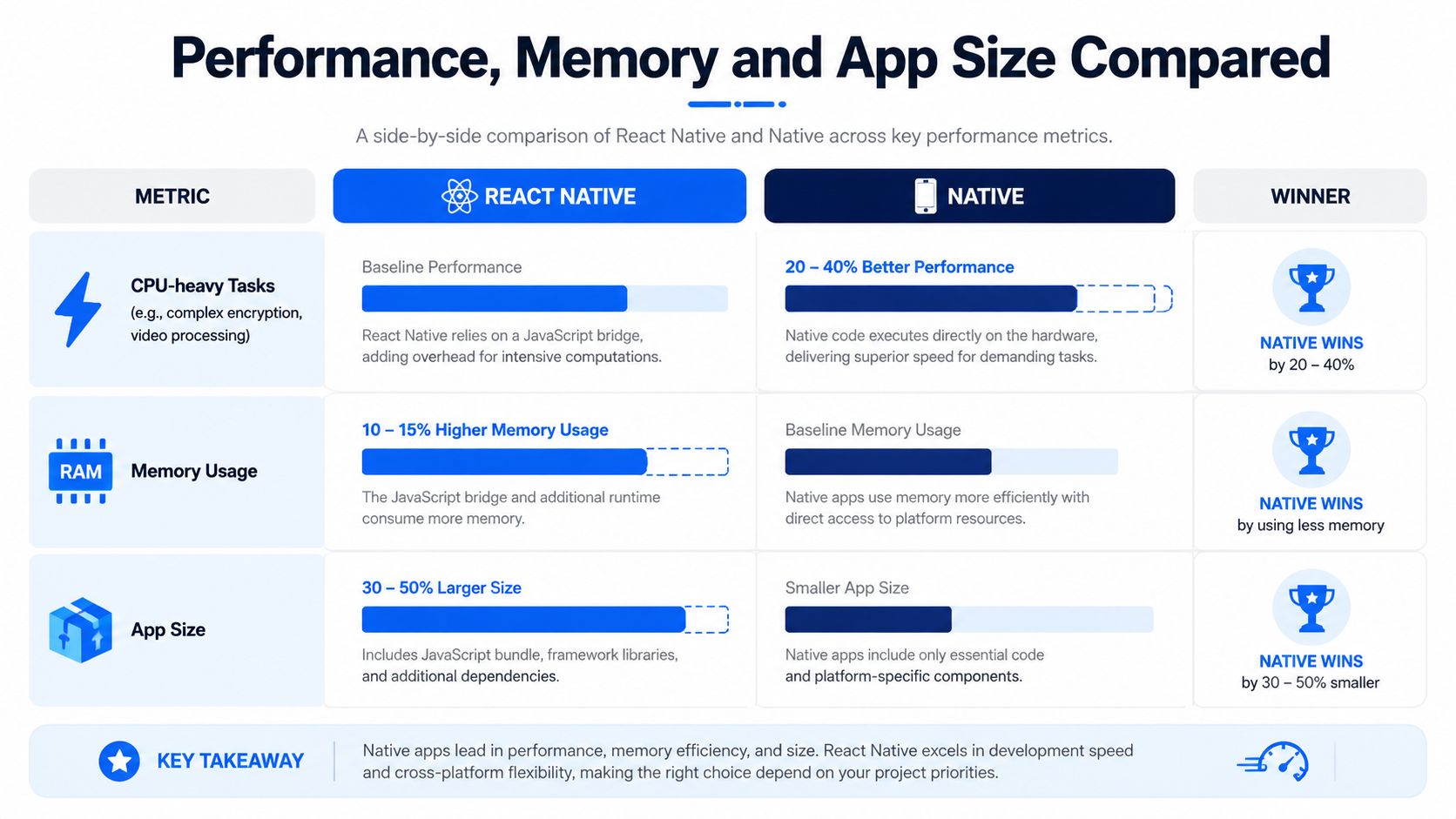
Those results point to three practical differences. React Native carries the JavaScript runtime and framework infrastructure, which can increase startup work and memory consumption. Native applications compile more directly against each platform, so they usually have a smaller runtime footprint and a clearer route to optimise CPU-intensive operations.
The same research found that React Native animation frame rates were comparable to, or better than, native in a user-interface test. Matrix multiplication, however, was reported as up to 34.8 times slower than native, showing why a smooth list or form doesn't prove that React Native will suit demanding computation.
Match the stack to the workload
React Native is a credible choice for:
- Read-heavy products: Content, catalogues, account areas and standard dashboards can perform well when the main work involves fetching data and rendering conventional screens.
- Business workflows: Forms, search, messaging and CRUD interfaces rarely need maximum CPU throughput.
- Shared product logic: A common implementation can reduce divergence between iOS and Android.
Native is the safer choice for:
- CPU-bound features: Encryption, video processing, 3D graphics, intensive image processing and other workloads that spend substantial time calculating.
- Strict resource limits: Products where battery, memory or package size directly affects adoption.
- Deep platform optimisation: Apps that depend on specialised operating-system frameworks or precise background behaviour.
For a more focused comparison of managed and bare React Native setups, the Expo vs bare React Native benchmarks are useful reading before you finalise the project structure. If you are evaluating delivery options with a UK team, this overview of React Native App Development explains where cross-platform delivery works well and where native support is still required. Your technical architecture also affects future performance decisions, so document the boundary between shared and native code early in the role of technical architecture in mobile app development.
The rule is simple: if the app is primarily read-heavy, React Native is usually sufficient; if it is compute-heavy, native is usually the better investment. Measure the flows that differentiate your product instead of relying on a framework reputation.
Cost, Hiring and Total Ownership in the UK
React Native often reduces the initial build cost because one team can deliver both platforms. One UK service source gives an example of an enterprise project falling from £400,000 for separate native apps to £250,000 in React Native, and claims that ongoing maintenance can drop by 60%. Those are vendor-provided figures, not a guaranteed quote, so use them as an illustration of the commercial model rather than as your business case.
Another UK guide says cross-platform development with Flutter or React Native often saves 30% to 40% compared with separate native iOS and Android builds. This UK app development cost guide reinforces the usual headline advantage, but the saving only survives if the product doesn't later require extensive native work.
Where the ownership bill appears
| Cost category | React Native | Native, Swift plus Kotlin |
|---|---|---|
| Initial build | Usually lower because shared code covers both platforms | Usually higher because iOS and Android work run separately |
| Product maintenance | One main codebase, plus native modules and dependency management | Two codebases, each aligned with its platform tooling |
| Specialist hiring | Cross-platform developers may cover more shared work, but production native skills still matter | Requires access to iOS and Android specialists |
| Compliance work | Shared flows help, but platform-specific testing and store obligations remain | Direct platform control can simplify some technical evidence |
| Performance tuning | May require profiling across JavaScript and native layers | Teams optimise directly within each platform |
| Release management | Shared releases can reduce duplication, but dependencies can create upgrade work | More duplicated QA and release coordination |
| Post-launch roadmap | Efficient for shared features, less so for platform-heavy additions | Predictable for platform-specific capabilities, with more delivery effort |
The UK hiring question deserves more attention than it gets. IT Jobs Watch recorded 238 permanent UK React Native vacancies in the six months to 22 August 2026, alongside a median salary of £75,000. That suggests React Native demand is narrower than the “large talent pool” pitch implies, and scarce production experience can offset an initial build saving. The UK React Native jobs data is particularly relevant for founders planning long-term support rather than a short-lived prototype.
Budget for dependency upgrades, Xcode and Android Studio changes, security patching, accessibility testing, analytics, experimentation and operating-system migration work. You should also assess App Store and Google Play review requirements, GDPR responsibilities and accessibility obligations under the Equality Act 2010. For broader context on recruiting and contracting, see this guide to software developer hiring costs in 2026.
A founder should compare the full runway, not just the first statement of work. The UK app development cost guide can help structure that estimate around product scope, integrations, testing and support.
The cheapest architecture is the one your team can maintain without repeatedly rewriting the parts that customers depend on.
User Experience and Platform Integration
Users don't care whether your team shares code. They care whether scrolling feels natural, biometric prompts appear at the right moment and the app behaves like the platform they already understand.
Native development gives iOS and Android teams direct control over platform conventions. On iOS, that includes gesture handling, scroll physics, haptics, Dynamic Type and VoiceOver behaviour. On Android, the team can implement Material You theming, TalkBack semantics, Android back navigation and device-specific UI patterns without translating those requirements through a shared abstraction.
React Native works well for standard navigation, forms, lists and content views. Platform-specific features may require additional native development. A product may need native modules for NFC, Face ID, biometric prompts, background processing, push notifications through APNs and FCM, Apple Watch, Wear OS or platform-specific widgets.
Integration changes the delivery plan
A React Native team doesn't avoid native development entirely. It either adopts maintained libraries, writes native modules or asks a Swift or Kotlin developer to solve the platform-specific part. That can still be the right decision, but the project plan must include the integration, testing and upgrade work.
Both React Native and native apps can support accessible experiences. WCAG-aligned testing with VoiceOver and TalkBack is possible in React Native, but native UIKit and Compose primitives often give specialists a more direct and predictable foundation. Cross-platform component libraries can introduce their own semantics, focus behaviour and platform exceptions.
React Native usually shortens the first delivery cycle because the team can implement shared flows together. It may then need platform-specific polish passes to match local conventions. Native takes longer to duplicate design and QA across platforms, but each platform can reach expected behaviour without the same abstraction adjustments.
For Android products, the role of UX design in Android application development is a useful reminder that platform behaviour belongs in product design, not just in final-stage engineering.
Which Stack Fits Which Product
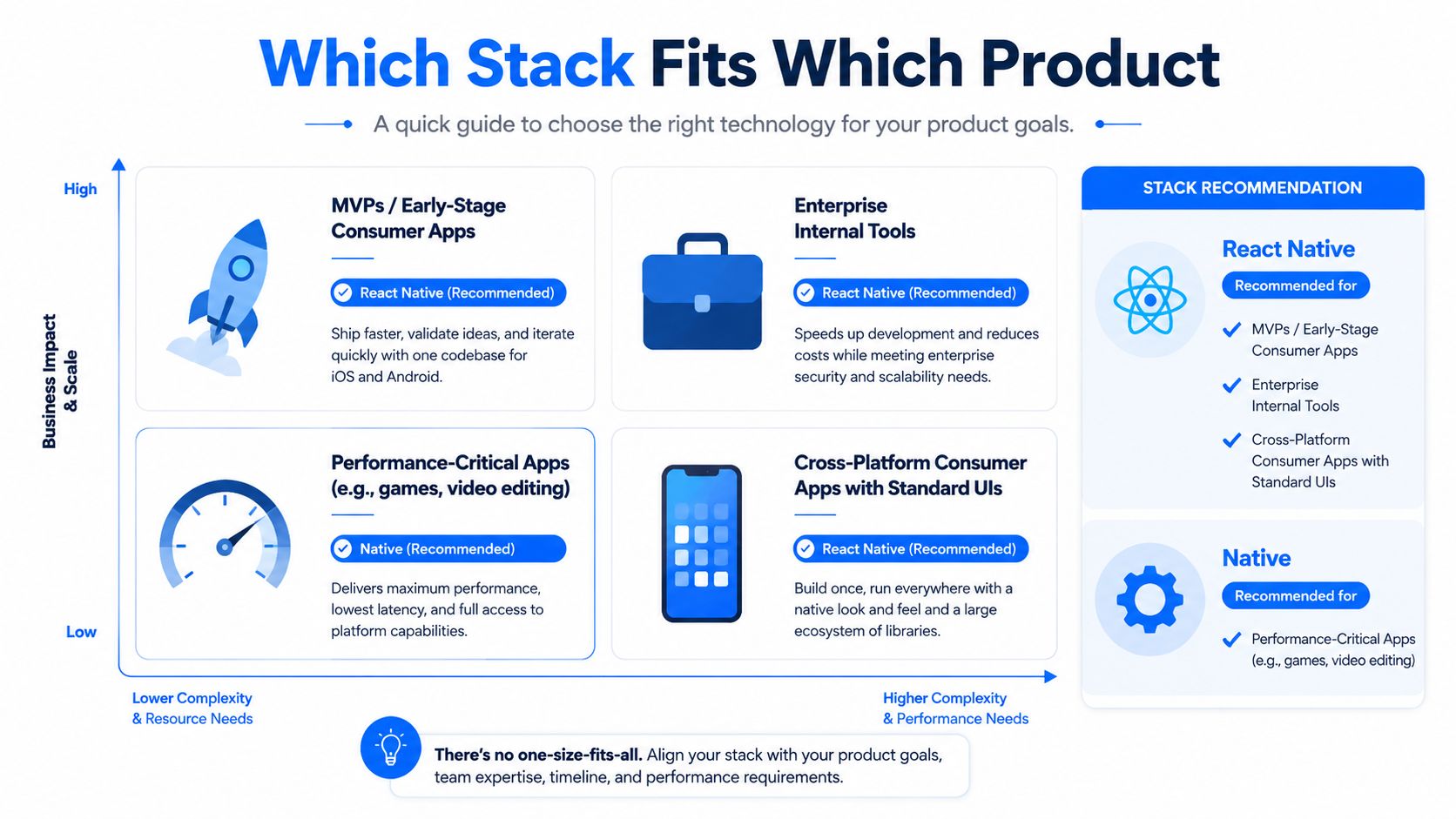
The right stack follows the product's defining risk. A marketplace with listings, search, messaging and payments has different technical priorities from an app that processes camera frames or controls a regulated financial workflow.
React Native suits shared product behaviour
Choose React Native when most of the product consists of shared business logic and conventional mobile screens:
- MVPs and early consumer products: React Native is the sensible default when you need to validate a hypothesis quickly and the differentiator isn't camera processing, augmented reality or low-latency graphics.
- Social and content products: Feeds, profiles, publishing, messaging and notifications can benefit from shared implementation.
- Marketplaces and retail: Catalogues, checkout journeys, order tracking and account management often fit the framework well, provided payment and device integrations are assessed early.
- Internal tools: Operational forms, approvals, reporting and staff workflows usually gain more from delivery efficiency than from platform-specific rendering.
- Web-connected products: Teams already comfortable with React can often reuse patterns and engineering practices, although React Native components aren't ordinary HTML and still require mobile-specific development.
Native suits platform and regulatory exposure
Choose native when the product's credibility depends on direct platform control:
- Fintech: FCA-regulated payment products, Strong Customer Authentication, PSD3 planning, Secure Enclave access, Apple Pay and Google Pay integrations all increase the value of direct platform expertise.
- Healthcare: Products involving NHS login, the NHS App or EHR FHIR APIs need careful consideration of clinical safety obligations, including DCB0129. Native may be preferable when platform-specific security or integration requirements are extensive.
- Public-sector services: The UK Government Digital Service explicitly standardises on Swift for iOS and Kotlin for Android in its mobile guidance. The guidance page was updated in 2026, which makes native a current operational standard in UK government practice, not merely a legacy preference. The Government Digital Service programming language standard is a strong signal for citizen-facing and public-sector-adjacent work.
- Performance-critical products: Games, advanced video tools, intensive imaging, augmented reality and products with demanding on-device machine learning generally benefit from native implementation.
- Deep platform products: HealthKit, CarPlay, Android Auto, watch companions, widgets and specialised background services can make native the cleaner long-term architecture.
Use this decision rule before choosing React Native: if more than three core flows require platform-specific APIs, go native. If only a small number do, React Native may still work, but budget for properly maintained native modules and specialists who can debug beyond JavaScript.
Choosing Between React Native and Native
The stack you choose depends on the risks your company can absorb, the people it can hire in the UK and the rules your product must satisfy.
Start with compliance and regulatory exposure. A regulated fintech product, healthcare service or accessibility-critical public service should normally use native unless there is a documented reason to choose React Native. Direct access to platform security and accessibility features can reduce integration uncertainty. A cross-platform layer can require more evidence and testing to demonstrate correct behaviour across iOS and Android.
Team access comes next. React Native can reduce duplicated feature work, but a serious roadmap still needs Swift and Kotlin knowledge. If you cannot hire or retain engineers who understand native modules, signing, store requirements and operating-system debugging, the single codebase becomes a single point of failure. That hiring risk matters as much as the initial delivery plan.
A startup testing a consumer proposition, content service or internal workflow can favour React Native when it needs an early release in weeks rather than months. The case is strongest when the first version relies on standard screens, APIs and account journeys. Keep enough budget for native support, because those assumptions can change after launch.
Review the post-launch roadmap before committing. Native is safer when later releases depend on HealthKit, CarPlay, Android Auto, wearables, specialised background work or low-latency processing. React Native remains a sensible choice when the product will mainly add shared forms, content, search, messaging, commerce and account features.
| Decision filter | Favours React Native | Favours Native |
|---|---|---|
| Compliance exposure | General consumer or internal product with limited regulated behaviour | Fintech, healthcare, public-sector or accessibility-critical service |
| Team structure | One team with strong TypeScript and access to native support | Established Swift and Kotlin specialists |
| Launch objective | Cross-platform MVP and rapid product validation | Product where platform quality is part of the core proposition |
| Performance profile | Standard UI, content, forms, API-driven workflows | CPU-heavy processing, advanced graphics or strict latency |
| Roadmap | Shared business features across iOS and Android | HealthKit, CarPlay, Android Auto, wearables or specialised services |
| Maintenance risk | Team can verify key libraries and own native integrations | The business needs direct control over platform changes |
Use these filters together rather than scoring them equally. If React Native has the stronger case, validate every critical native module before development begins. Assign ownership for upgrades, store submissions and operating-system changes, then include platform-specific testing in the delivery plan.