


Android app development is the process of designing, building, testing and releasing applications for devices that run Android, including smartphones and tablets. Native Android development primarily uses Kotlin with Android Studio, while cross-platform frameworks such as Flutter and React Native also support Android applications.
You may be a UK founder with a validated idea, a product manager modernising an internal tool, or an organisation preparing to handle payments and personal data through a mobile interface. The first decision isn't just whether you need an app. It's which Android users you need to serve, what information the app will handle, how reliably it must work across devices, and how you'll maintain it after launch.
Android remains a major mobile platform in the UK, accounting for more than 50% of the mobile operating-system market in January 2025, according to Statista's UK Android market-share data.
This guide explains what Android app development means, how the work progresses from discovery to release, which tools shape the build, and when native Android is more appropriate than Flutter or React Native. It also treats security, UK GDPR, device coverage and post-launch support as part of the product itself.
What Is Android App Development?
Android app development is the process of designing, building, testing and releasing software for devices that run the Android operating system. That includes smartphones and tablets, as well as products such as Wear OS watches, Android TV devices and Android Auto experiences. Google Play is the primary distribution channel for most consumer Android apps.
Android apps run across a broad hardware ecosystem. Samsung, Google Pixel, Xiaomi and other Android devices vary in screen size, hardware capability, Android version and manufacturer-specific behaviour. The UK government’s Mobile Ecosystems Market Study recorded 30–40 million active Android smartphones and 5–10 million active Android tablets in the UK in 2020. This scale and device diversity make testing across representative Android devices important rather than relying on a single flagship handset.
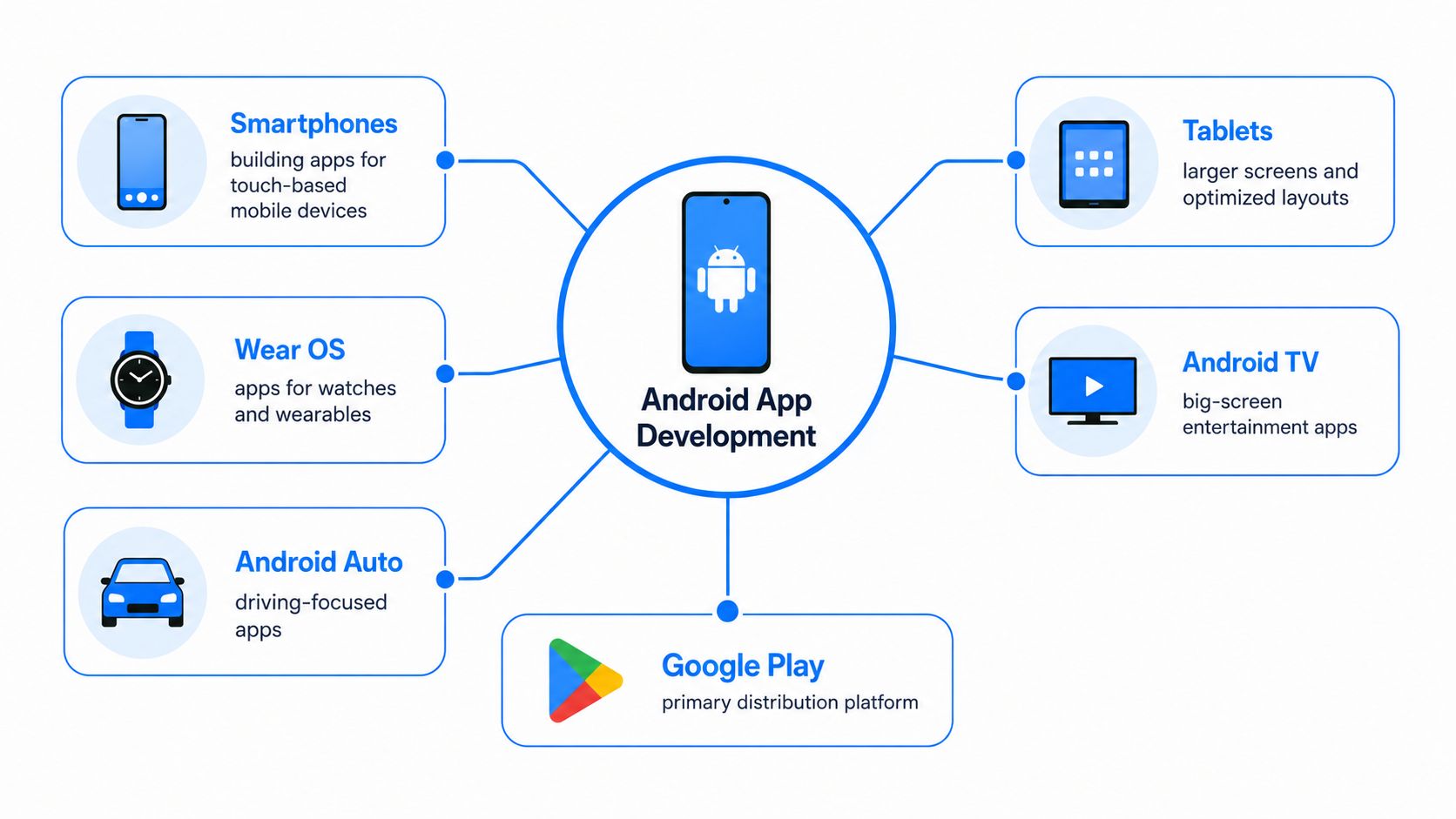
Three practical forms of Android work
Native Android development uses Kotlin, Android Studio and Android's own SDKs and libraries. It gives engineers direct access to platform capabilities and is a natural fit for performance-sensitive or security-sensitive products.
Cross-platform development uses frameworks such as Flutter or React Native to share parts of the codebase across Android and other platforms. The finished product still needs Android builds, Android testing and platform-specific release work.
Android-specific customisation adapts software for dedicated enterprise hardware, such as warehouse scanners, transport terminals or company-managed devices. These projects often involve device policies, hardware integrations and controlled deployment.
A finished app is more than screens and source code. It normally requires a signed Android App Bundle or APK, a Google Play Console listing, backend services for accounts and data, and integrations such as Firebase or Google Play Services for messaging, analytics or configuration. Before collecting personal data, the product also needs a lawful privacy approach aligned with UK GDPR and the Data Protection Act 2018.
The UK's Android economy reinforces this commercial context. A 2025 study found that Google Play and Android generated £770 million in direct revenue for UK developers in 2025, while supporting a wider mobile economy worth £104 billion across areas including e-commerce, digital media and the gig economy. The Google Play and Android economic-impact study describes Android as a mobile gateway for UK digital businesses, particularly consumer apps, marketplaces and service platforms.
How Does Android App Development Work?
Android app development works through six connected phases: discovery and strategy, UX/UI design, development, testing, release and ongoing maintenance. Each phase moves the product from a defined user problem to a tested, published and maintained Android application.
1. Discovery and strategy
The team defines the users, problem, core journeys, success measures and minimum viable product. It also creates a GDPR data inventory, identifying what personal data the app collects, where it travels, how long it remains available and which suppliers process it.
The team should agree a target device list at this point. That list might include recent Samsung and Pixel phones, budget Android handsets, tablets or specialised hardware. It should also identify supported Android API levels, accessibility needs, offline behaviour and integrations such as payments, identity services or booking systems.
2. UX and UI design
Designers map user flows, create wireframes and prototype the key journeys in Figma. Material 3 components provide a familiar Android visual language, while accessibility checks should address WCAG 2.2 AA requirements, including readable contrast, usable touch targets, focus order and meaningful labels.
A prototype exposes confusing navigation before engineers build it. For a London delivery app, testing the address, payment and order-tracking flow with representative users is more valuable than polishing a secondary settings screen.
3. Engineering setup and development
Engineers create the Android Studio project, configure Gradle, establish environments and connect the chosen backend. They build features in Kotlin or the selected cross-platform framework, integrate APIs, and store the work in Git through GitHub or Bitbucket.
A team should separate development, staging and production data. That prevents test accounts from reaching real customers and gives reviewers a safe place to validate new functionality.
4. Testing and quality assurance
Testing combines unit tests with JUnit, instrumented interface tests with Espresso, manual checks and device coverage. A device lab should include relevant Samsung, Pixel and budget handsets, rather than relying on one developer phone. Security review can include permission checks, dependency analysis and MobSF scans.
LAD describes its workflow as iterative, with requirements and planning, UX/UI design, technical setup, development and API integration, QA and device testing, followed by Google Play release. Its Android app development process guide provides useful context on how those activities fit together.
5. Pre-launch and release
The release team prepares Google Play assets, completes the Data safety form, adds a privacy-policy URL, selects a content rating and creates internal, closed or open testing tracks. A signed App Bundle is normally the practical publishing artefact for a Play release.
6. Maintenance
After launch, the team monitors crashes, reviews feedback, manages staged rollouts and updates dependencies. Compatibility work must continue as Android versions evolve, including Android 14, Android 15 and Android 16 support planning where those versions fall within the product's support policy.
Practical rule: Treat privacy, device support and release monitoring as delivery work, not tasks to add after the first version is complete.
What Programming Languages and Tools Are Used for Android App Development?
The main programming languages used for Android app development are Kotlin and Java for native apps, Dart for Flutter, and JavaScript or TypeScript for React Native. Supporting tools include Android Studio, the Android SDK, Jetpack libraries, Gradle and platform-specific testing and deployment tools.
Kotlin is Google's preferred language for Android development and the primary choice for new native Android projects. Java remains relevant for maintaining and extending existing Android codebases. Android Studio is the official IDE, while Jetpack provides libraries for common development requirements. Jetpack Compose supports declarative UI development, and Room provides an abstraction layer for local database access.
Flutter uses Dart to build applications from a shared codebase across Android, iOS and other supported platforms. React Native uses JavaScript or TypeScript and shares application logic across Android and iOS. Both frameworks support platform-specific Android code when an application requires native APIs or device capabilities.
| Stack | Language | IDE | UI framework | Best for |
|---|---|---|---|---|
| Native Android | Kotlin, with Java in existing codebases | Android Studio | Jetpack Compose or XML | Android-focused products, deep device access and demanding workflows |
| Flutter | Dart | Android Studio, IntelliJ or Visual Studio Code | Flutter widgets and Material 3 | Shared-code products with a highly controlled visual design |
| React Native | JavaScript or TypeScript | Android Studio, Visual Studio Code or other supported editors | React Native components | Teams with strong web capability and shared product logic |
The supporting tools matter as much as the language. Gradle manages builds and dependencies. The Android SDK and platform tools provide platform libraries and device communication. Firebase supports authentication, messaging, analytics and remote configuration. GitHub or Bitbucket manages source control, while Fastlane automates parts of build and Google Play upload workflows.
Non-technical buyers should ask an agency which language, framework, Android Studio version, SDK levels and dependency-management approach it will use. A resource such as Webtwizz's guide for an indie hacker mobile app builder is useful for understanding how JavaScript-based mobile work fits into a broader product-building path, but it shouldn't replace a project-specific architecture review.
For a more detailed tool-by-tool explanation, see Android app development tools. The key question is whether the selected stack matches the app's device access, maintenance needs and compliance obligations.
How Are Android Apps Structured and Their Interfaces Built?
Android apps are structured around application components, resources and architectural layers that separate the user interface, data, business logic and system interactions. This separation makes individual parts of the application easier to develop, test and maintain.
What Are the Four Main Android App Components?
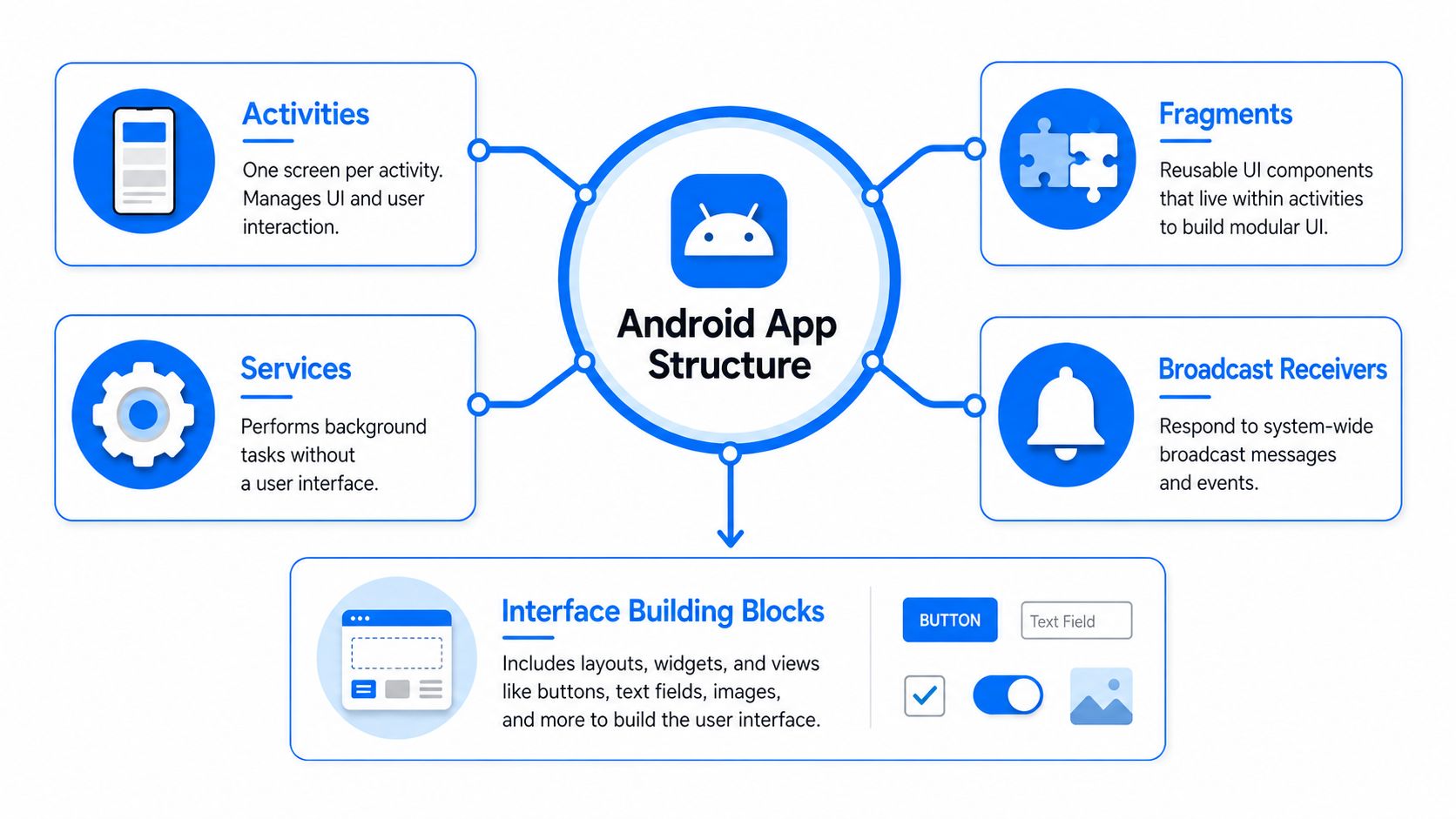
Android defines four main application component types:
Activities represent entry points with a user interface. A Manchester banking app might use an activity to host the login and account overview experience.
Fragments are reusable portions of an interface inside an activity. A food delivery app could reuse an address selector or order summary across different screens.
Services handle work without a visible screen, such as controlled background processing or media playback. Android's background limits mean engineers must use the appropriate modern APIs rather than leaving unrestricted work running.
Content providers expose structured data between applications when a controlled sharing mechanism is appropriate. They aren't required for every app, but they remain part of Android's component model.
Fragments are reusable portions of an application's UI hosted within an activity. They remain common in existing Android applications, although Jetpack Compose provides a different approach to building and organising modern interfaces.
The AndroidManifest declares the app's components, permissions, capabilities and compatibility information. Engineers use the resources directory to separate strings, images, icons, colours and other assets from application logic. That separation supports translation, screen adaptation and consistent design changes.
How Are Android Interfaces and Architecture Built?
New Android builds often use Jetpack Compose instead of XML layouts. Compose describes the interface as a function of its current state, which makes UI updates more direct. Existing applications frequently combine Compose with XML, so a migration plan matters more than a blanket replacement.
A common architectural pattern is Model-View-ViewModel. The model represents data and business rules, the view displays state, and the ViewModel coordinates screen state without placing business logic inside buttons or layouts. Hilt provides dependency injection, allowing components such as repositories and API clients to be supplied consistently and replaced with test doubles during automated testing.
Material 3 gives the interface reusable components, themes and interaction conventions. It doesn't remove the need for good product design, but it reduces inconsistency across Android screens and device sizes. The role of UX design in Android application development is especially important when the app must support accessibility, responsive layouts and clear task completion.
A well-separated structure also prepares the product for extensions such as widgets, Wear OS tiles and Android Auto interfaces. Those additions still need their own interaction constraints, but they don't need to destabilise the core application.
What Is the Difference Between Native and Cross-Platform Android Development?
The main difference is that native Android development builds specifically for Android, while cross-platform development shares code across Android and other platforms such as iOS. Native development commonly uses Kotlin and Android APIs directly, while Flutter uses Dart and React Native uses JavaScript or TypeScript with their respective cross-platform frameworks.
Consider a Bristol fitness startup deciding between a Flutter MVP and a Kotlin build. If its first release mainly contains onboarding, training plans, subscriptions and content, Flutter may provide an efficient shared foundation if an iOS version is also required. If the product depends on specialised sensors, persistent device interactions or carefully tuned background behaviour, native Kotlin deserves stronger consideration from the beginning.
That example isn't a promise about cost or delivery time. It demonstrates the decision principle: choose the architecture around the hardest requirement, not the easiest screen.
| Criteria | Native Kotlin | Flutter | React Native |
|---|---|---|---|
| Time to market | Focused Android work avoids cross-platform coordination, but a separate iOS build needs separate implementation | Shared code often supports rapid multi-platform iteration | Shared logic supports multi-platform delivery, especially for web-oriented teams |
| Cost | Higher when separate platform teams and implementations are required | One shared team may cover several targets | One shared team may reuse JavaScript or TypeScript capability |
| Performance | Direct access to Android APIs and platform-optimised behaviour | Strong UI performance for common product workloads, with native code available when needed | Suitable for many products, with native modules for platform-specific work |
| Device APIs | Full Android access through Kotlin and the Android SDK | Plugins or platform channels may be needed for specialised capabilities | Native modules or bridges may be needed for specialised capabilities |
| Team availability | Requires Android-specific Kotlin expertise | Requires Dart and Flutter experience | Suits teams with JavaScript or TypeScript experience |
| Maintainability | Clear Android ownership, but separate platform codebases increase work when iOS is also supported | One principal codebase can simplify shared feature changes | Shared logic helps, while native bridges need ongoing attention |
| Play Store updates | Uses Android's standard build and release pipeline | Produces Android release artefacts through the Android toolchain | Produces Android release artefacts through the Android toolchain |
Match the route to the product
Choose native Kotlin when the app needs deep Android integration, demanding performance, specialised hardware access or strict control over sensitive workflows. Native also gives the team the clearest route to Android platform APIs and security features.
Choose Flutter when a product needs one shared implementation with a strongly controlled visual system and its most difficult requirements are available through stable plugins or manageable native extensions. Choose React Native when the organisation already has JavaScript or TypeScript capability and shared product logic is a major priority.
Security changes the calculation. For a fintech workflow, payment product or app handling sensitive records, the team must examine storage, authentication, device compromise and update governance before selecting the framework. The React Native versus native comparison can help founders frame that discussion around actual product requirements rather than a simplistic speed-versus-cost argument.
How Are Android Apps Tested, Secured and Published on Google Play?
Android apps are tested through automated and device-based testing, secured through appropriate data and platform controls, and published through Google Play Console after release requirements are completed. Testing, security review and release validation work together to identify functional, compatibility and security problems before production.
Start with layered testing
Unit tests with JUnit check business rules and data transformations quickly. Instrumented UI tests with Espresso exercise Android screens and interactions on devices or emulators. Beta testing through Firebase App Distribution or internal Play tracks exposes problems that automated tests don't reproduce, including manufacturer behaviour, permissions, network conditions and confusing user flows.
Continuous integration should run these checks for every material change. Organisations working with regulated financial or health-related information need an auditable process that shows which code was tested, which build was released and who approved it.
Treat security as a release requirement
The UK National Cyber Security Centre recommends minimising on-device data storage, keeping sensitive information in the hardware-backed Android KeyStore, using secure mutually authenticated connections for sensitive traffic and enabling certificate pinning through Network Security Configuration. It also recommends release builds with debug information stripped and code shrinking or optimisation enabled. These practices reduce exposure when a device is lost or compromised.
A practical security review covers:
Storage: Encrypt local data with suitable Android security libraries and avoid retaining information the app doesn't need.
Transport: Protect sensitive API traffic and validate the server connection rather than trusting an unexamined network.
Screens: Disable screenshots on sensitive screens where the workflow requires it.
WebView: Restrict WebView capabilities and avoid granting access that the feature doesn't require.
Builds: Use release mode, strip debugging information and enable shrinking or obfuscation through tools such as R8.
UK GDPR also affects incident response. Under the breach rules described in the UK app code of practice, certain personal-data breaches must be reported to the ICO within 72 hours of awareness where feasible, while affected individuals must be informed without undue delay when the breach is likely to create a high risk to their rights and freedoms.
Publish, observe and improve
The release team uploads a signed APK or App Bundle, checks the Play listing, completes the Data safety form and supplies the privacy-policy URL. Google Play then distributes the build to the selected release track. Play's App Bundle documentation explains how Google Play generates device-appropriate APKs from the uploaded bundle through its Android App Bundle publishing guidance.
Store assets also need clear descriptions, accurate screenshots and an honest representation of the product. Teams preparing those materials may find UGC Copilot's guidance on AI-driven app store assets useful, provided every claim in the listing remains accurate and compliant.
After release, monitor crashes, rollout health, reviews and support tickets. The NCSC notes that most Android devices receive software updates for up to 3 years after release, while many brands now provide up to 7 years. Devices at end of life no longer receive security updates, so the support policy must define which older Android populations the app will continue to serve.
When an Android Project Needs a Professional Development Team
A professional Android app development team is appropriate when the project requires specialist expertise across architecture, security, integrations, testing, release management or ongoing support. The need becomes stronger as technical complexity, data sensitivity and operational requirements increase.
Several signals point to that threshold:
Complex journeys: The product contains more than three core user flows, multiple account states or several external integrations.
Release friction: Google Play rejects builds repeatedly, or the team lacks confidence in its Data safety and privacy declarations.
Device complaints: Users report slow behaviour or inconsistent screens on mid-range Samsung A-series devices.
Security findings: An audit identifies unsafe storage, excessive permissions, weak authentication or exposed debug information.
Operational needs: The product requires continuous integration, crash reporting, staged releases, on-call ownership or documented rollback procedures.
The choice between a UK freelancer, a nearshore squad and a full-service agency shouldn't rest on the headline day rate. Compare accountability, code ownership, GDPR contract clauses, security practices, availability after launch and the clarity of the support agreement.
Before the first sprint, ask for:
- A Google Play portfolio review, including products with comparable device and integration requirements.
- Kotlin code samples or a technical walkthrough of the proposed architecture.
- Relevant personnel checks, including DBS-checked staff where sensitive verticals require them.
- ICO registration evidence where the supplier's processing activities make it relevant.
- A signed data processing agreement before personal data enters the project environment.
London App Development is one UK option that provides native Android development with Kotlin, cross-platform work with Flutter and React Native, product design, testing, release and ongoing support. Whether you choose LAD or another supplier, insist on a written architecture decision, a device-testing plan and a post-launch responsibility matrix.
Android app development is therefore a product, engineering and compliance decision. Start by documenting the user problem, data flows, target devices and hardest technical requirement. Then select the delivery route that gives your team enough control to ship safely and maintain the app after Google Play release.
If you’re planning an Android product for the UK market, choosing an app development agency in London starts with a clear project brief. Define your target users, core journeys, integrations and data requirements so the development team can establish the architecture, testing scope and release plan before development begins.