


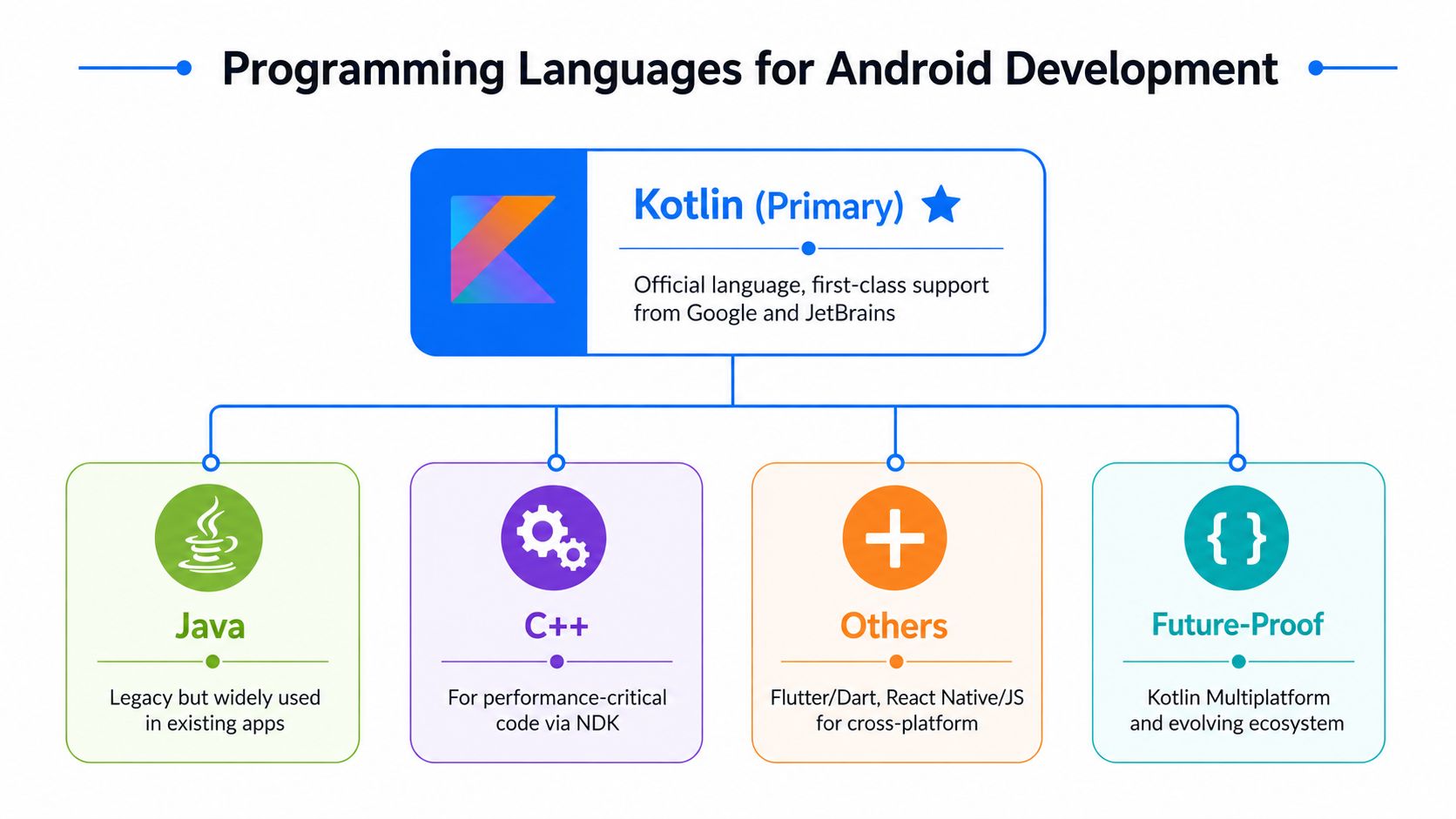
Choosing the right android programming language affects delivery speed, hiring, maintainability and platform fit. For most modern native projects, Kotlin is the default choice, but Android app delivery often involves more than one technology, including Java, C++, Dart, frameworks and development tools. If you are evaluating build options with an agency or in-house team, our Android app development services should begin with product requirements, device support, roadmap and budget, not a generic preference for one stack.
1. Java
Java is a programming language, and it was the original main language for Android app development. When Android launched, most apps were built in Java against the Android SDK and platform APIs. Java still appears across many production Android codebases, especially in older apps, enterprise systems and products with long maintenance histories.
Java's main advantages are its mature ecosystem, broad developer familiarity and extensive library support. It remains useful when an existing Android app already has stable Java modules, proven integrations or a team with strong Java experience.
Java is best used when you are maintaining or extending an established Android app, integrating with Java-based systems or modernising gradually without rewriting the full codebase.
2. Kotlin
Kotlin is a programming language, and it is the primary modern language for native Android app development. Google officially supports Kotlin for Android, and Android documentation and tooling treat it as a first-class choice, as described in Google's Kotlin overview for Android.
Kotlin is used to build native Android screens, application logic, services and modern UI with Jetpack Compose. It works directly with existing Java code, which makes it practical for both new builds and gradual migration.
If you want a broader commercial overview of how Kotlin fits into planning, architecture and delivery, this guide to Android app development provides useful context.
Its key advantages are null safety, concise syntax, coroutines, extension functions and strong support across Android Studio, Jetpack and Android KTX. These features reduce repetitive code and improve maintainability in day-to-day development.
Kotlin is best used for new Android apps, active feature development, modern native architecture and teams that want the strongest long-term alignment with the Android platform. For additional platform context, JetBrains' announcement about Kotlin on Android and Google's Android Kotlin guidance explain why Kotlin became the preferred modern option.
3. Dart
Dart is a programming language, and it is primarily used for Android app development through Flutter. Dart is not the default native Android language, but it is central to Flutter-based cross-platform development.
Developers use Dart to write the shared application code and interface logic in Flutter, then compile that app for Android and other platforms. This approach helps teams deliver one codebase across mobile operating systems.
Dart's main advantages are fast development cycles, hot reload in Flutter and a consistent way to build cross-platform interfaces. The trade-off is that Flutter is a framework layer, so teams still need to account for Android testing, integration and platform behaviour.
Dart is best used when a product needs both Android and iOS releases with a broadly consistent interface and the team has chosen Flutter as the delivery framework.
4. C++
C++ is a programming language, and it is used in Android app development through the Android NDK for native modules. It is not the normal choice for standard Android application code, but it matters in selected technical cases.
Teams use C++ for performance-sensitive processing, native engines, computer vision, games and reuse of established C or C++ libraries. It operates at a lower level than Kotlin or Java and usually sits behind a Kotlin or Java application layer.
Its key advantages are speed, direct access to native libraries and fine-grained control over low-level behaviour. Its disadvantages are higher complexity, harder debugging and a smaller hiring pool.
C++ is best used when profiling identifies a genuine performance requirement or when the product depends on native code that already exists.
5. C#
C# is a programming language, and it is used for Android app development mainly through Microsoft frameworks such as Xamarin and .NET-based tooling. It is not a core native Android language in the way Kotlin is, but it remains relevant in some cross-platform development setups.
Developers use C# to write shared mobile application logic and, depending on the framework, parts of the user interface for Android and other platforms. This can support code reuse in organisations already invested in Microsoft technologies.
C# offers strong tooling, object-oriented structure and familiarity for .NET teams. The practical limitation is that Android development quality still depends on the framework layer, library support and access to platform-specific features.
C# is best used when a business already has strong .NET capability and wants to extend that stack into mobile delivery.
6. JavaScript
JavaScript is a programming language, and it is used for Android app development mainly through frameworks such as React Native. JavaScript is not used as the standard native Android language, but it is widely used in cross-platform mobile development.
In Android projects, JavaScript usually powers shared application logic and interface code inside a framework that bridges to native functionality. Teams often pair it with TypeScript for stronger type safety.
Its key advantages are access to a large developer ecosystem, reuse of web development skills and faster adoption for companies that already work with React. Its limitations appear when a product needs deep platform integration, very specific native behaviour or advanced Android-first optimisation.
JavaScript is best used when an existing React-capable team can genuinely accelerate cross-platform delivery.
7. Python
Python is a programming language, but it is not a mainstream choice for standard Android app development. Python appears more often in prototyping, backend systems, automation and selected mobile wrappers than in conventional Android app production.
Where it is used for Android, it is usually through specialist tools rather than the default Android toolchain. That means it sits outside the normal Kotlin, Java and Android Studio workflow used by most commercial Android teams.
Python's advantages are readability, a large general-purpose ecosystem and quick experimentation. Its weakness in Android delivery is that it is not aligned with the platform's primary native development model.
Python is best used for supporting systems, scripts, experiments or niche mobile implementations rather than as the first choice for a production Android app.
8. React Native
React Native is a framework, not a programming language, and it is used to build Android apps with JavaScript or TypeScript. It provides a cross-platform development approach that allows teams to share substantial code between Android and iOS.
React Native is used to create mobile user interfaces and application logic while relying on native modules for platform-specific functionality. It works best when the team already understands React and mobile delivery constraints.
Its key advantages are code sharing, access to a large JavaScript ecosystem and a practical path for web-focused teams entering mobile. Its limits appear when products require advanced Android-specific integrations, highly customised native behaviour or heavy dependence on the latest platform APIs.
React Native is best used when the business already has React expertise and wants a realistic cross-platform route without building separate native teams immediately.
9. Swift
Swift is a programming language, and it is primarily used for iOS app development rather than Android app development. It does not serve as a normal Android language, but it matters in mobile strategy because many Android products later need an iOS version.
Swift is used to build native iPhone and iPad apps, including user interfaces, business logic and platform integrations inside Apple's ecosystem. It is relevant when a company is planning native delivery across both major mobile platforms.
Its key advantages are modern syntax, strong performance and direct alignment with Apple's current development approach. For Android work, its role is comparative rather than primary.
Swift is best used when the product needs a native iOS app alongside Android.
10. Xamarin
Xamarin is a framework, not a programming language, and it uses C# for Android app development. It sits within Microsoft's mobile development approach and supports shared code across platforms.
Teams use Xamarin to build Android and iOS apps with a significant amount of shared logic. It is part of a broader .NET ecosystem rather than the default Android-native stack.
Its advantages include C# reuse, Microsoft tooling and a familiar environment for .NET developers. Its practical fit depends on project requirements, framework maturity and how much native platform fidelity the app needs.
Xamarin is best used when a company has a strong .NET foundation and wants to extend that capability into mobile.
11. HTML and CSS
HTML and CSS are web technologies, not programming languages for native Android app development. They are used in mobile delivery mainly through web apps, hybrid app wrappers or embedded web views.
Developers use HTML and CSS to build the presentation layer of web-based mobile experiences, sometimes paired with JavaScript and a wrapper that packages the result for Android devices.
Their main advantages are broad familiarity, fast interface iteration and reuse of existing web assets. Their limitation is that they do not provide the same native Android integration, performance profile or platform fidelity as Kotlin-based native development.
HTML and CSS are best used for responsive web products, lightweight hybrid apps or content-led mobile experiences rather than feature-rich native Android apps.
12. Corona
Corona is a framework and toolkit, not a programming language, and it has been used for mobile app and game development with Lua. It is more closely associated with lightweight 2D app and game development than with mainstream business Android applications.
In Android projects, Corona has been used to speed up development for interactive mobile experiences where cross-platform deployment matters. It abstracts much of the underlying platform layer.
Its advantages include simplicity, rapid prototyping and suitability for certain game scenarios. Its limitation is that it is not part of the standard modern Android business app stack.
Corona is best used for selected lightweight interactive projects rather than mainstream native Android application development.
13. Flutter
Flutter is a framework, not a programming language, and it uses Dart to build Android apps. It is one of the main cross-platform options considered alongside native Android development.
Flutter is used to create a shared user interface and application logic for Android and iOS from one codebase. It renders its own interface layer, which gives teams strong visual consistency across platforms.
Its key advantages are rapid development, hot reload, consistent UI output and efficient cross-platform workflows. The main trade-off is that teams still need to manage Android platform testing, release processes and native integrations where required.
Flutter is best used when a product needs Android and iOS delivery with one coordinated team and a deliberately shared interface.
Why are Programming Languages Important for Android App Development?
Programming languages are important for Android app development because they determine how the app is built, maintained, tested, scaled and integrated with Android devices and services. The language affects code safety, developer productivity, performance characteristics, access to Android APIs, hiring options and the long-term cost of change.
In practical terms, language choice shapes the whole engineering workflow. Kotlin supports modern native Android development with direct tooling support, concise syntax and null-safety features. Java remains important where legacy code already delivers value. Cross-platform choices such as Dart with Flutter or JavaScript with React Native change how teams share code, design interfaces and handle platform-specific behaviour.
That is why language selection is not a cosmetic decision. It affects build speed, app quality, release risk, staffing and how easily the product adapts as customer requirements change. For a practical business-level explanation of Android app development, the main point is simple: the right language helps the team deliver useful Android software with fewer unnecessary constraints.
Which Programming Language is Easiest for Android App Development?
Kotlin is the easiest programming language for Android app development for most modern native projects. It is easier because Android officially supports it, Android Studio is designed to work with it smoothly, and its syntax reduces much of the boilerplate that made older Android code slower to write and maintain.
Kotlin is considered easy in practical development because it includes null safety, concise model definitions, extension functions and coroutines for asynchronous work. Those features make common Android tasks clearer and reduce repetitive code. Kotlin also interoperates with Java, which helps teams adopt it without rebuilding everything from scratch.
For a business planning an Android app, ease matters because a language that is quicker to read, review and extend usually lowers delivery friction for an MVP and ongoing feature work.
What is the Most Popular Programming Language for Android App Development?
Kotlin is the most popular programming language for modern Android app development. Google positions Kotlin as the preferred language for Android, and the wider Android ecosystem treats it as the default choice for new native work, as shown in Google's Kotlin developer guidance.
That popularity reflects platform support, strong developer adoption and widespread use in production Android apps. Java remains common in legacy codebases, but Kotlin leads the conversation for current Android-native development because it aligns with Android documentation, libraries and modern architecture guidance.
Can Multiple Programming Languages Be Used for Android App Development?
Yes, multiple programming languages can be used for Android app development. A single Android product often includes Kotlin for new native features, Java for legacy modules and C++ for selected native processing. Cross-platform products may also combine Kotlin or Java native modules with Dart, JavaScript or C# through frameworks.
This happens because mobile apps are not always built from one language alone. Teams use different technologies for interface code, shared business logic, native integrations, performance-sensitive modules and backend-connected services. The important requirement is not purity. It is architectural clarity, maintainability and choosing each technology for a defined purpose.
What Programming Languages Are Used to Develop iOS Apps?
Swift and Objective-C are the main programming languages used to develop iOS apps. Swift is Apple's modern default language for native iPhone and iPad development, while Objective-C remains present in older codebases and some long-standing libraries.
In cross-platform strategy, iOS delivery may also involve Dart with Flutter, JavaScript or TypeScript with React Native, or shared business logic through Kotlin Multiplatform. The native iOS language choice still matters whenever the product needs platform-specific interfaces, Apple ecosystem integration or native performance.
What Programming Languages are Used to Develop Mobile Apps?
The main programming languages used to develop mobile apps include Kotlin, Java, Swift, Dart and JavaScript. These languages appear across native Android development, native iOS development and cross-platform frameworks that target both systems.
Kotlin
Java
Swift
Dart
JavaScript
What Programming Languages Does Android Studio Support?
Android Studio supports Kotlin, Java and C++ directly for standard Android development. Kotlin and Java are the main application-level languages in the normal Android workflow, while C++ is supported through the Android NDK for native components.
Android Studio also supports work on projects that involve other technologies, but that does not make those technologies native Android languages in the same sense. For example, teams may use Android Studio with Flutter projects that rely on Dart, yet the IDE itself remains part of the broader Android development environment rather than evidence that every framework is a native Android language.
If you are comparing IDE support, build workflows and testing utilities in more depth, this overview of Android app development tools is relevant to the tooling side of the decision.
Practical Comparison for UK Teams
UK teams should choose Android technologies based on product scope, hiring reality and platform requirements. The most practical default is still native Kotlin for Android-first products, Java for established Android codebases and cross-platform frameworks only when shared delivery clearly outweighs the trade-offs.
| Technology | Entity type | Main Android role | Best fit |
|---|---|---|---|
| Kotlin | Programming language | Modern native Android development | New Android apps and active feature work |
| Java | Programming language | Legacy and existing Android codebases | Maintaining mature Android systems |
| C++ | Programming language | Native performance modules | Games, media, computer vision, native libraries |
| Dart | Programming language | Flutter app code | Shared Android and iOS delivery |
| JavaScript | Programming language | React Native app code | React-led cross-platform teams |
| C# | Programming language | Xamarin and .NET mobile development | Microsoft-oriented teams |
| Flutter | Framework | Cross-platform UI and app delivery | One shared interface across platforms |
| React Native | Framework | Cross-platform mobile development | Existing React capability |
| Xamarin | Framework | Cross-platform .NET mobile development | Existing .NET capability |
For Android-specific products involving NFC, widgets, background processing, secure storage or deep platform integrations, native Kotlin remains the strongest commercial and technical choice. If you want a wider planning view on platform direction, hiring and build choices, our article on Android development trends adds useful context. Hiring conditions also affect stack choice in practice, and recent UK Android contract job data can help teams gauge market demand when planning recruitment or contractor support.
Native Android, Cross-platform and Migration Considerations
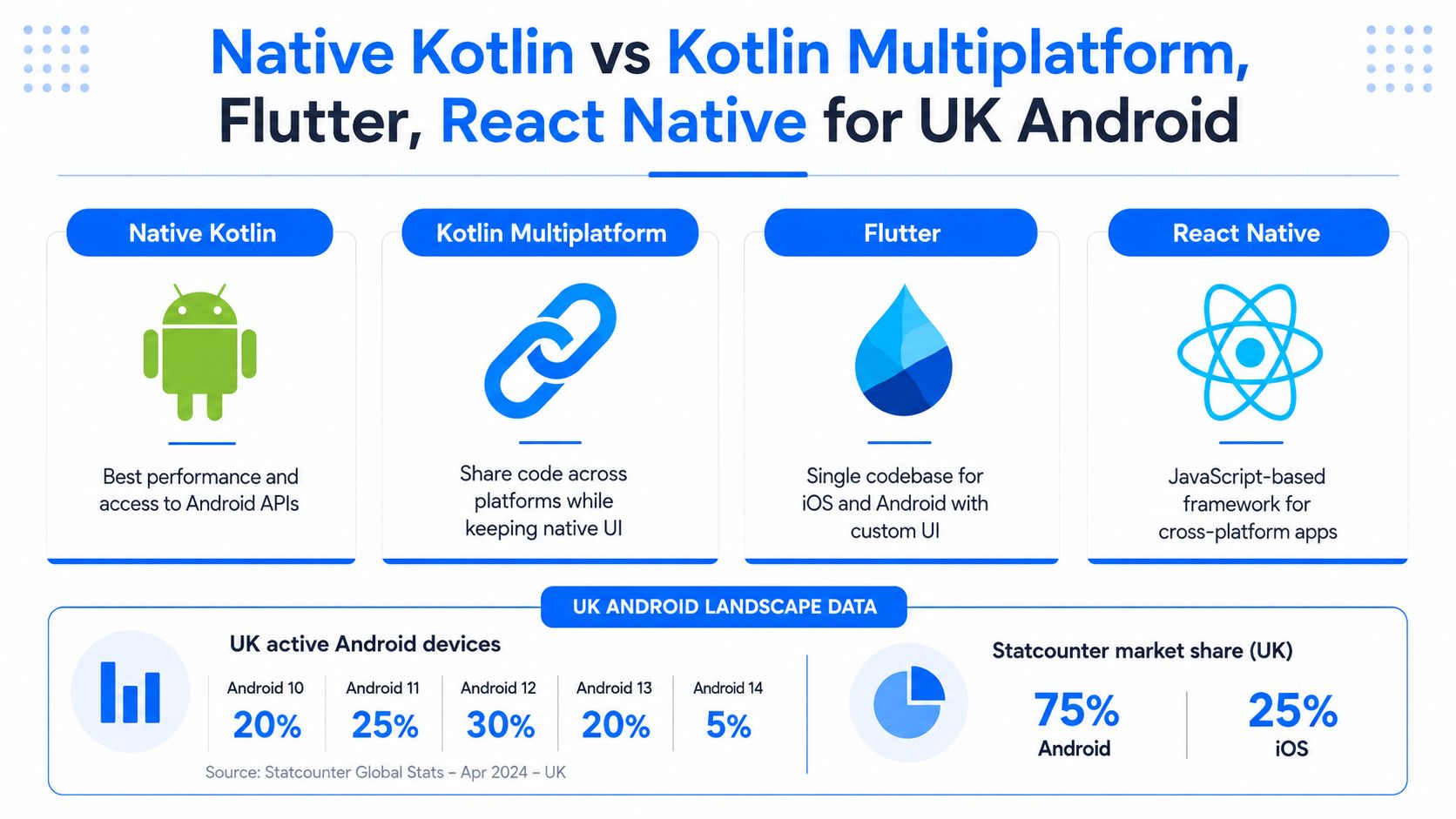
Native Android and cross-platform development solve different business problems. Native Kotlin is best when Android behaviour, device integration and platform-specific quality matter most. Kotlin Multiplatform is useful when teams want to share business logic while keeping native interfaces. Flutter and React Native are suitable when one team needs to ship to Android and iOS with a high level of shared code. Google's Kotlin Multiplatform documentation is useful here because it explains the shared-logic model without treating it as a full replacement for native Android UI.
Existing Java codebases do not need blanket rewrites. Kotlin and Java interoperate well, so teams can modernise file by file and keep stable Java modules where they still earn their place. C++ should stay limited to measured native needs. If you are weighing shared code against full native delivery, this comparison of React Native versus native app development helps frame the trade-offs. For businesses comparing platform priorities, current UK mobile operating-system market data is most useful at the strategy stage because it helps estimate whether Android-first, iOS-first or dual-platform delivery is commercially sensible.
The Android Tooling and Ecosystem You Will Actually Use
Android Studio, the Android SDK, Gradle and Jetpack form the practical Android development toolchain. These are tools and libraries, not programming languages, but they shape how Android software is built and maintained.
Android Studio provides the editor, emulator, debugger and profiler most Android teams use every day. The Android SDK and platform tools provide the APIs, build targets and device communication layer required to compile and test an app. Jetpack libraries support architecture, persistence, navigation and modern UI, while Android KTX adds Kotlin-focused extensions that improve readability. Google's Android's Kotlin-first documentation is relevant here because it shows how the platform's official tooling and guidance now centre on Kotlin.

A sensible Android setup usually includes:
Android Studio for coding, debugging and emulator checks.
Android SDK and platform tools for builds, API targets and device communication.
Gradle with Kotlin DSL for typed, reviewable build configuration.
Jetpack libraries such as Compose, ViewModel, Room, Hilt and Navigation.
Android KTX for more idiomatic Kotlin interaction with Android libraries.
The following video offers a visual introduction to the Android Studio workflow:
Choosing the Right Android Technology Mix
The right Android technology mix depends on whether you are building native, cross-platform or modernising an existing app. Start new native Android products in Kotlin. Keep stable Java where it still provides value. Use Flutter or React Native only when cross-platform delivery supports the roadmap better than separate native builds. Use C++ only when performance or library reuse justifies the added complexity.
For SMEs and founders, the clearest rule is to match the technology to the product requirement, not to a trend label. Good Android delivery comes from choosing the right combination of language, framework, tooling and migration path for the product you actually need to support. Teams specifically evaluating low-code or assisted Flutter delivery may also want to review this FlutterFlow development agency resource in that narrower context, rather than treating it as a general Android technology recommendation